
Custom skills assessments are a better way to evaluate candidates than relying solely on resumes or educational backgrounds. They focus on practical abilities, matching candidates to the specific needs of a role. Here’s what you need to know:
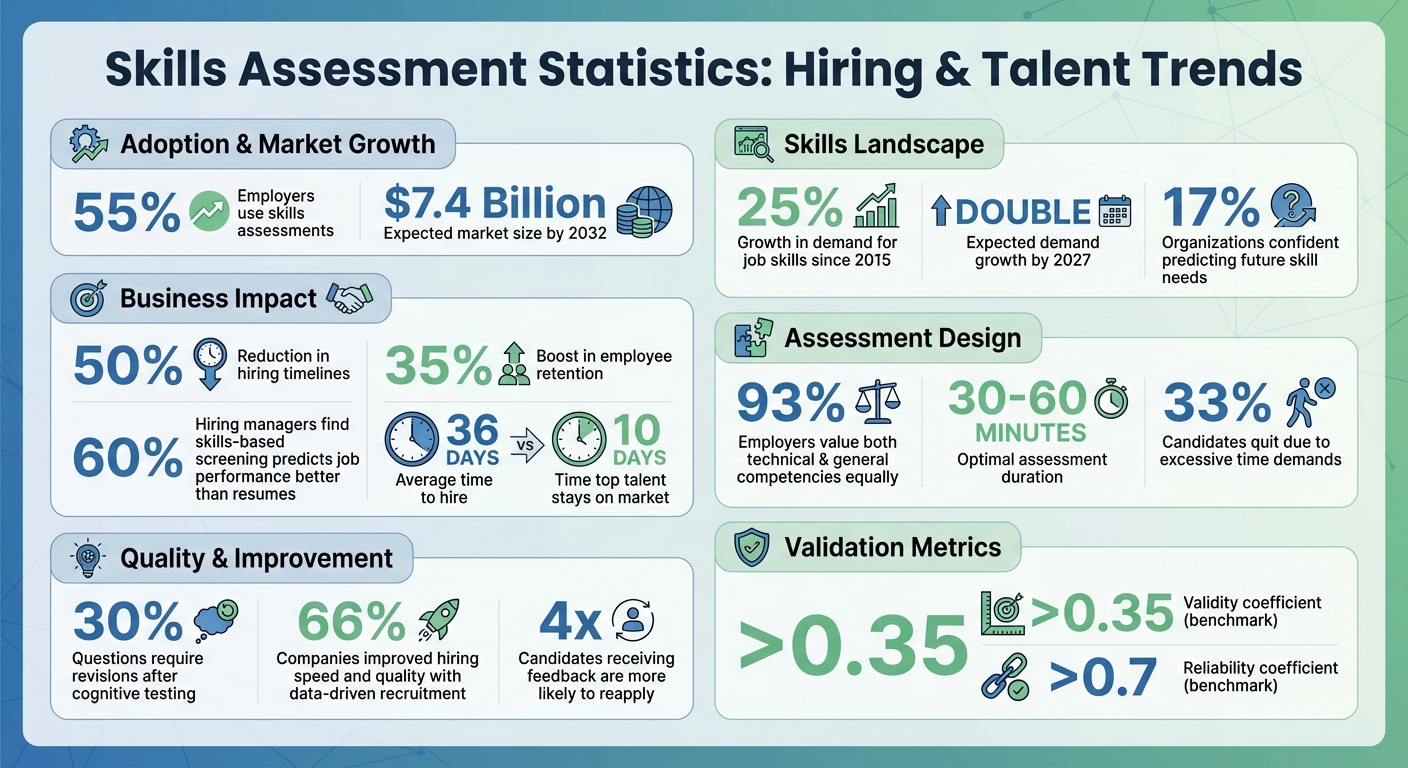
- Why they’re effective: Over 55% of employers now use skills assessments, which improve hiring accuracy, reduce timelines by 50%, and boost retention by 35%.
- Key design tips: Assessments should be concise (30–60 minutes), job-specific, and test both technical and interpersonal skills. Use real-world scenarios like debugging code or responding to customer queries.
- Fairness and accuracy: Avoid cultural or linguistic biases, use clear scoring rubrics, and pilot test with current employees to ensure clarity and relevance.
- Automation and feedback: Platforms can streamline the process, and providing feedback – even to unsuccessful candidates – enhances your reputation.
Custom assessments help you hire based on ability, not just credentials, leading to stronger, more capable teams.
Skills Assessment Statistics: Impact on Hiring Success and ROI
Skills-Based Hiring: What You MUST Know in 2025
sbb-itb-e5b9d13
Identifying Required Skills and Competencies
To create an effective assessment, you first need to identify the exact technical, cognitive, and interpersonal skills needed for success. Since 2015, the demand for job skills has grown by 25%, and this trend is expected to double by 2027. Yet, only 17% of organizations feel confident in predicting the skills they’ll need in the future. To pinpoint job-specific skills, consult experts and review the performance of current employees.
Finding Job-Specific Skills
The best place to start is with the people who understand the role inside and out. Subject matter experts – like department heads, line managers, and HR professionals – can help outline measurable success criteria tied to each responsibility. Collaborate with stakeholders to break down key responsibilities into the skills needed to accomplish them. For instance, if you’re hiring a web developer, don’t stop at "HTML/CSS knowledge." Clarify whether the role involves teamwork with designers, technical communication, or handling high-pressure troubleshooting.
Another useful method is internal benchmarking. Test your draft assessment with top-performing employees to establish a baseline. This process highlights the skills actively being used in the role. You can also consult industry standards from professional associations – like guidelines for accountants, project managers, or engineers – to define minimum qualifications. For a forward-looking approach, conduct a strategic gap analysis. This involves reviewing growth areas, upcoming technologies, and competitor practices to identify emerging skill needs.
"Twenty years ago, we wouldn’t have to look at skills in the workplace very often… Now the cycle time is changing. Some jobs need to be re-evaluated annually, others every six months, and the pace is only accelerating." – Scott Erker, Senior Client Partner, Korn Ferry
Once you’ve identified specific skills, make sure your framework also includes broader competencies that contribute to overall success.
Combining Broad and Specialized Skills
After identifying job-specific skills, design assessments that evaluate both technical expertise and general competencies. This is critical, as 93% of employers value both equally. Striking this balance is key: a software engineer may need coding expertise, but they also need to explain technical concepts to non-technical colleagues. Similarly, a customer service representative requires product knowledge alongside empathy and conflict resolution skills.
Organize your skills framework into categories like technical (e.g., data analysis, medical diagnosis), cognitive (critical thinking, problem-solving), interpersonal (communication, teamwork), administrative (project management, resource allocation), and personal (resilience, lifelong learning). For each skill, define proficiency levels – such as Apprentice, Journeyman, and Master – to compare candidates fairly and plan for development. However, avoid making the framework overly detailed. Skills should be specific enough to measure but not so complex that the assessment becomes unwieldy. This balanced approach ensures you’re capturing the full range of what drives success in the role.
Creating Assessment Questions
When crafting assessment questions, focus on testing specific skills tied directly to the job. Every question should align with a job requirement – otherwise, you risk gathering irrelevant data that won’t improve hiring decisions. Keep your questions straightforward, targeted, and based on real-world work scenarios.
A well-designed question should pass the "Cover-Up Test" – meaning the question stem alone should clearly convey the concept being tested. Stick to testing one concept per question. This approach makes it easier to identify the exact skill gap if a candidate answers incorrectly.
"A high-quality question is clear (one interpretation), fair (no unintended advantage), targeted (measures the intended skill/knowledge), and useful (the result leads to a decision)." – Michael Hodge, Research & Methodology, Quiz Maker
For multiple-choice questions, use distractors (incorrect options) that reflect common real-world errors instead of obviously wrong answers. Ensure all answer choices are similar in length and grammar to avoid unintentional clues. Also, steer clear of negative phrasing like "NOT" or "EXCEPT", as this can confuse candidates and increase their cognitive load. For pre-screening tests, aim for a duration of 30–45 minutes, while more in-depth technical evaluations can go up to 180 minutes.
Selecting Question Types
Choosing the right question format is key to accurately assessing the target skill. Here are some common formats and their strengths:
- Multiple-choice questions: Great for covering broad knowledge areas with consistent scoring, though they carry a guessing risk (25% with four options).
- Coding exercises: Best for evaluating technical skills such as coding and debugging.
- Case studies: Useful for assessing complex decision-making and architectural design.
- Situational judgment tests: Ideal for testing prioritization and soft skills.
- Chat simulations: Measure real-time communication abilities.
- Open-ended questions: Offer insights into a candidate’s thought process and creativity.
Match the question type to the skill or competency you’re evaluating. For factual knowledge, use formats like multiple-choice or fill-in-the-blank. For technical tasks, coding challenges or productivity tool exercises are more appropriate. Behavioral traits, such as teamwork or leadership, are better assessed through rating scales or 360° feedback questions. Avoid combining unrelated topics in a single question – e.g., "Is your manager supportive and available?" – as this can muddle the data. Using a mix of question formats can keep candidates engaged while improving the accuracy of your evaluation.
The next step is designing questions that reflect the actual demands of the role.
Using Job-Related Scenarios
Custom skills assessments should mirror the tasks candidates will face on the job. Instead of abstract or theoretical questions, present practical, role-specific challenges like debugging real code or resolving customer support tickets. Research shows that 60% of hiring managers find that skills-based screening predicts job performance better than resumes or education.
Adjust the complexity of scenarios based on the seniority level of the role. For junior-level positions, focus on foundational concepts, while senior-level assessments may involve tasks like architectural design or optimization. Provide just enough context – such as the purpose, background, and clear expectations – to help candidates concentrate on the task. Avoid including unnecessary details that could distract or overwhelm them.
Start with a simple "warmup" task to build confidence and ease candidates into the assessment platform before moving to more challenging problems. Run the assessment with your current team first to identify issues like unclear instructions, unexpected time sinks, or biases in the questions. This step ensures a smoother experience for candidates and more reliable results.
Building Fair and Accurate Assessments
To make the most of custom skills assessments, fairness and accuracy need to be at the core of their design. A fair assessment evaluates candidates solely on their ability to perform relevant job tasks.
One common mistake is designing scenarios that rely on specific cultural knowledge. For instance, an SAT analogy question using the word "regatta" highlighted a major performance gap linked to cultural familiarity rather than intelligence. To avoid this, assessments should focus on practical job-related tasks and steer clear of pop culture references, brain teasers, or idioms that could unintentionally disadvantage non-native speakers or individuals from diverse backgrounds.
"The best check against bias remains thoughtful educators who know their students well and approach assessment with both rigor and cultural sensitivity." – Guillermo Solano-Flores, Professor of Education, Stanford University
Before rolling out an assessment, test it with your current team or colleagues from varied cultural and linguistic backgrounds. Train evaluators to spot common biases, such as confirmation bias (looking for evidence to support preconceived opinions), the halo/horn effect (letting one trait influence the overall impression), and recency bias (giving undue weight to the most recent part of an assessment).
Creating Consistent Scoring Standards
Without a clear scoring system, two evaluators might score the same assessment completely differently. A structured rubric ensures every candidate is judged against the same criteria rather than personal preferences.
Start by identifying 3–7 core competencies directly linked to the job. Translate these competencies into observable actions – focus on what candidates do rather than subjective traits like "effort" or "attitude." Define 4 or 5 performance levels with specific behavioral examples. For instance, a "Foundational" level might state, "Fails to address core constraints", while an "Advanced" level could read, "Anticipates risks and makes strong tradeoffs with detailed reasoning".
Assign weights to each competency based on its importance. For example, critical thinking or technical expertise should carry more weight than less crucial factors like formatting. Establish minimum score thresholds for essential areas such as ethics, safety, or accessibility. Avoid vague terms like "good" or "creative" in your rubric; instead, use clear, actionable descriptions such as "Identifies underlying assumptions" or "Applies concepts in novel ways with logical explanations".
Conduct calibration sessions where multiple evaluators independently score the same sample work and then discuss any discrepancies until they reach consensus. Aim for at least 80% agreement among evaluators, with a variance of roughly ±0.5. This process helps refine your rubric and ensures consistent evaluations.
"Without a scoring rubric, you’re back to opinion-based decisions. Two examiners could score wildly divergent marks for the same examination." – Samson Benjamin, Product Marketer, MTestHub
Once scoring standards are in place, the next step is to ensure the assessment platform accommodates all candidates equally.
Making Assessments Accessible
Accessibility is key to giving every candidate an equal chance. Keep assessments within a 30–60 minute timeframe to reduce fatigue and prevent drop-offs, as 33% of candidates quit hiring processes due to excessive time demands.
Ensure the platform supports tools like screen readers, adjustable font sizes, and high-contrast settings. Offer text-to-speech functionality and translated instructions for candidates who are bilingual or learning English. Enable "Permissive Mode" so candidates can use their own assistive tools, such as predictive text software or specialized hardware.
Be proactive about accommodations. Allow candidates to use noise-canceling headphones, fidget devices, or medical equipment like glucose monitors. Provide digital tools such as sticky notes, notepads, and access to scratch paper for organizing thoughts. If speed isn’t critical to the role, remove or adjust timers, as timed tests can disadvantage neurodivergent candidates or those with slower processing speeds.
Clear communication is also crucial. Let candidates know upfront about the time commitment, deadlines, and how their results will be used. Offer flexible completion dates, especially for those juggling current jobs. Interestingly, candidates who receive feedback on their assessments are four times more likely to reapply to your company in the future – even if they don’t get the job.
These steps create a foundation for continuously improving your assessments.
Testing and Improving Your Assessments
Pilot testing plays a crucial role in ensuring your assessments are effective, fair, and aligned with the intended goals. By uncovering strengths and identifying areas that need improvement, pilot tests help fine-tune your approach before full implementation.
Running Pilot Tests
Start by having current employees in the role take the assessment. This helps establish a baseline for performance and ensures the time limits are reasonable. For instance, if employees struggle to complete the test within 30 minutes, candidates are likely to face the same issue.
Next, bring in subject matter experts (SMEs) to verify the technical accuracy of the questions. To catch potential language issues, involve non-experts as well. SMEs might miss unclear wording because of their familiarity with the material, but non-experts can quickly highlight confusing prompts.
A structured pilot testing process often includes three key stages:
- Expert Review: Engage 3–5 specialists to evaluate the technical content.
- Cognitive Interviews: Conduct interviews with 5–15 participants where they "think aloud" as they answer questions. This helps identify areas where they hesitate or misinterpret.
- Soft Launch: Test with a larger group of 50–100 respondents to gather broader insights.
Throughout the process, track metrics like completion rates, drop-off points, and score distributions. For example, if many participants abandon a specific section or if scores cluster too tightly, it might indicate overly complex or unclear questions. Set clear criteria for moving forward – such as a minimum completion rate or acceptable median time – before scaling up to a larger audience.
"The time you save by skipping pilot testing is usually less than the time you waste analyzing bad data." – Lensym Team
The insights gathered during pilot testing will guide revisions, ensuring the assessment is optimized before a full rollout.
Applying Feedback for Updates
Feedback from pilot testing often reveals specific areas needing improvement. For instance, about 30% of questions typically require revisions following cognitive testing – nearly one out of every three. If you notice response patterns clustering at extreme ends, it may signal that the question isn’t effectively assessing the intended skill.
To validate the test’s accuracy, compare assessment scores with actual job performance. Look for benchmarks like a validity coefficient above 0.35 and a reliability coefficient over 0.7. These indicate the test is both useful and consistent.
As job roles evolve, your assessments should too. Regularly check whether high scorers on the test continue to excel in their roles. This long-term tracking helps confirm the test’s effectiveness. Additionally, frequent audits can uncover compromised questions that may have been shared publicly.
Use the data to refine your assessment. For example, if the median completion time exceeds your goal, consider removing non-essential questions. If certain groups consistently score lower without a clear job-related explanation, review those items for potential bias. The ultimate aim is to create an assessment that not only predicts success accurately but also respects candidates’ time and diverse experiences.
Adding Assessments to Your Hiring Process
Once you’ve completed pilot testing, it’s time to weave your tailored assessments into your hiring process. With validated assessments in hand, focus on automating and monitoring them to streamline operations and make smarter hiring decisions.
Using Technology for Automation
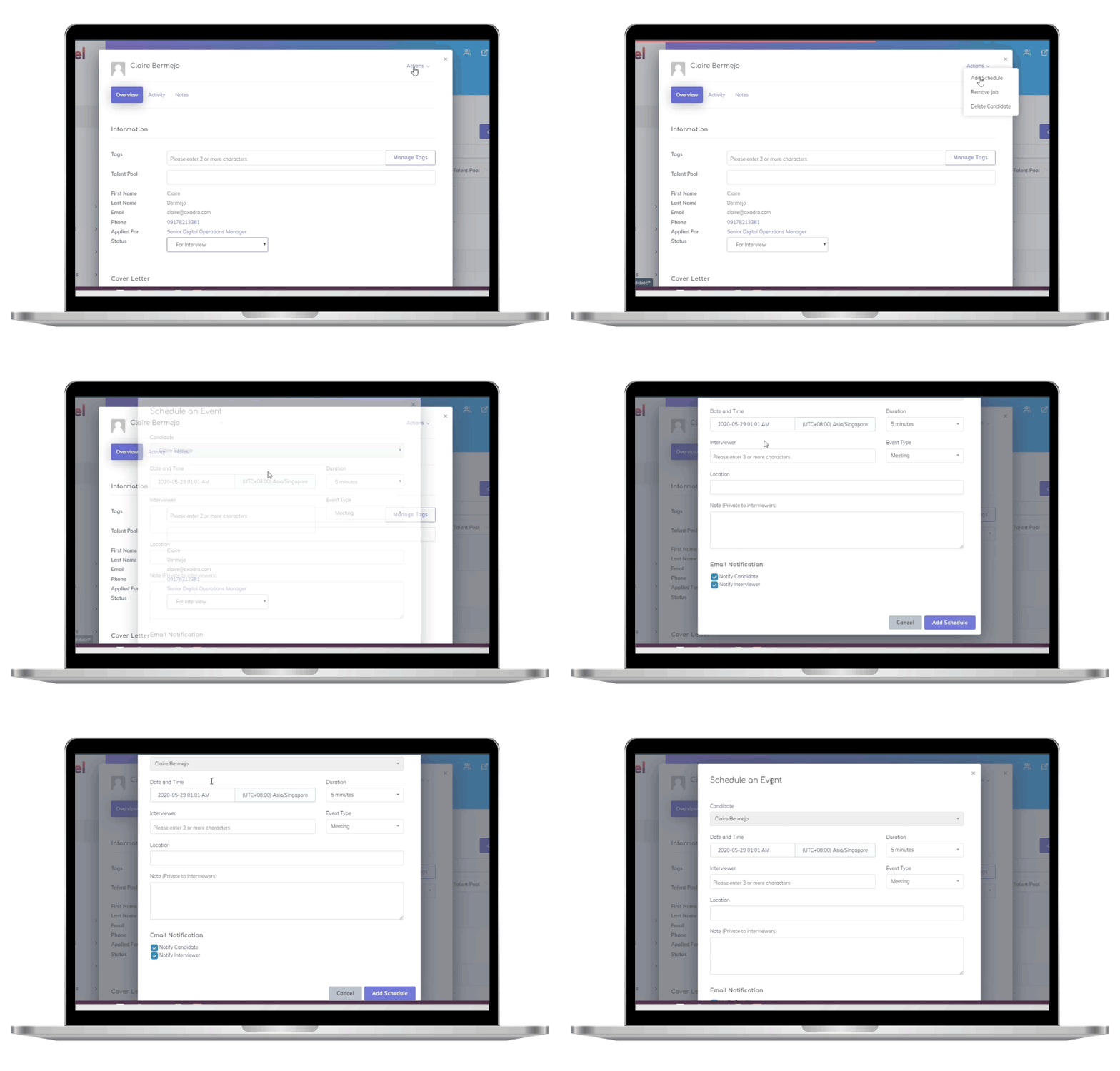
Manually managing assessments can pull recruiters away from more strategic priorities. Tools like Skillfuel handle the repetitive parts – sending invites, tracking completions, and syncing results – while ensuring every candidate has the same experience. Automation guarantees that applicants receive consistent instructions, time limits, and follow-ups, reducing bias and enabling fair comparisons. In fact, 60% of hiring managers believe that skills-based screening predicts job success better than resumes or education.
Keep assessments concise to avoid losing candidates mid-process. Early-stage tests should ideally last 30–60 minutes. Use automated messaging to explain how the assessment relates to the role – this transparency builds trust and keeps strong candidates in the pipeline. Skillfuel’s centralized dashboard simplifies managing the entire candidate flow in one place.
Once your process is automated, pay close attention to candidate performance data to refine and improve over time.
Monitoring Candidate Results
A centralized dashboard makes it easier to compare candidates side-by-side and identify trends. For example, tracking metrics like "time in stage" can reveal bottlenecks in your process. If candidates wait too long for feedback, they may move on to other opportunities. Consider this: while the average time to hire is 36 days, top talent is often off the market in just 10.
Use your current high performers as benchmarks to define success. Then, monitor how well new hires who scored highly perform in their roles. Data-driven recruitment has helped 66% of companies improve both hiring speed and quality. Use these insights to adjust scoring thresholds and refresh your question bank as needed.
Don’t overlook the candidate experience. Providing feedback – even to those who don’t get the job – makes a big difference. Candidates who receive feedback are four times more likely to reapply in the future. Automated feedback reports not only respect applicants’ time but also enhance your employer brand, regardless of the hiring outcome.
Conclusion and Key Takeaways
Summary of Main Points
Custom skills assessments are most effective when they closely align with real-world job responsibilities and respect the candidate’s time. Start by pinpointing the exact hard and soft skills the role demands – benchmarking against your top-performing employees can help establish realistic expectations. Design tasks that simulate actual job scenarios, such as debugging code, resolving support tickets, or prioritizing tasks. Keep early-stage assessments concise, ideally between 30–60 minutes, to maintain candidate engagement.
Consistency and fairness are critical. Use standardized scoring systems, run pilot tests with your team, and apply uniform criteria across all candidates. Automation can reduce manual errors and ensure a consistent experience for everyone. Once implemented, monitor performance data to identify which questions are the most predictive of success and refine your approach as needed. With over 55% of employers now leveraging assessments and the market expected to hit $7.4 billion by 2032, skills-based hiring is a proven strategy. Following these practices lays a strong foundation for integrating assessments into your hiring process.
Getting Started
Start small by focusing on one role at a time. Tailor each assessment to the technical and interpersonal skills that role requires. Work with subject matter experts to identify key competencies and use a variety of question types – such as multiple-choice, simulations, and scenario-based tasks – for a well-rounded evaluation. Test your assessments within your team before rolling them out to job candidates.
Platforms like Skillfuel can make the process easier by automating tasks like sending invitations, tracking completions, and consolidating results into a single dashboard. Automation not only simplifies operations but also ensures consistency throughout the evaluation process. These platforms also allow you to customize assessments to reflect your brand, set clear expectations for candidates, and deliver feedback reports that enhance your reputation as an employer. As Kristina Surerus from AJM Packaging shared:
"We utilize eSkill to determine a candidate’s capability that may not have the direct experience listed on their resume. This tool is very useful for Hiring Managers who may need some convincing to pull the trigger."
Start with a small pilot program, monitor key performance metrics, and adjust based on the data. The right assessment strategy not only speeds up hiring but also helps you build stronger, more effective teams.
FAQs
How do I decide what skills to test for a role?
To determine which skills to assess, start by identifying the core competencies needed for the role. Pinpoint the job-specific abilities, industry norms, and key behavioral traits that align with the position. It’s important to create assessments that address both technical expertise and soft skills, ensuring a well-rounded evaluation. Customizing these tests to the role makes them more relevant and effective, helping you select the best candidate for the job.
What’s the best way to score skills assessments fairly?
The best way to evaluate skills assessments fairly is to make the process clear, job-focused, and free from bias. Use tasks that mirror actual responsibilities to get a realistic sense of how candidates might perform on the job. To keep things consistent and impartial, rely on standardized scoring methods with objective benchmarks. Providing clear instructions and offering constructive feedback also helps candidates understand their performance and areas for growth. Always ensure assessments align closely with the role’s demands and apply the same evaluation standards across the board.
How can I make assessments accessible without weakening them?
To make assessments more accessible while maintaining their integrity, consider using inclusive design strategies. For example, provide multiple ways for participants to demonstrate their knowledge, such as through projects, oral presentations, or written tasks. Applying Universal Design for Learning (UDL) principles can help ensure that assessments meet diverse needs.
Focus on creating tasks that are specific to the role being assessed, steering clear of unnecessary complexity that might create barriers. It’s also essential to regularly review and adjust your assessment tools to ensure they remain fair and effective for everyone involved.