
Jobscan’s analysis of Fortune 500 career sites found an ATS running on 97.8% of them. Pair that with a separate survey of 630 recruiters showing that 92% of those systems don’t auto-reject anyone. They simply fail to surface non-matching resumes, which makes candidates invisible rather than declined. For recruiters, that distinction matters: your best applicant might already be in the database, scored at zero, buried where no search query will ever return them.
The numbers tell a clear story about where resume parsing technology fails, what causes ATS candidate filtering to miss people who should be in your pipeline, and what you can actually do about it on the recruiter side. Every claim below connects back to published data or documented testing, because opinions about parsing are everywhere and evidence is harder to find.
How Parsing Breaks at the Document Level
The core problem in 2026 isn’t keyword matching. It’s structural parsing at the code level of the document itself. When a candidate uploads a resume, the ATS reads the underlying file structure, not the visual layout. A resume that looks perfectly clean in a PDF viewer can be an absolute mess under the hood.
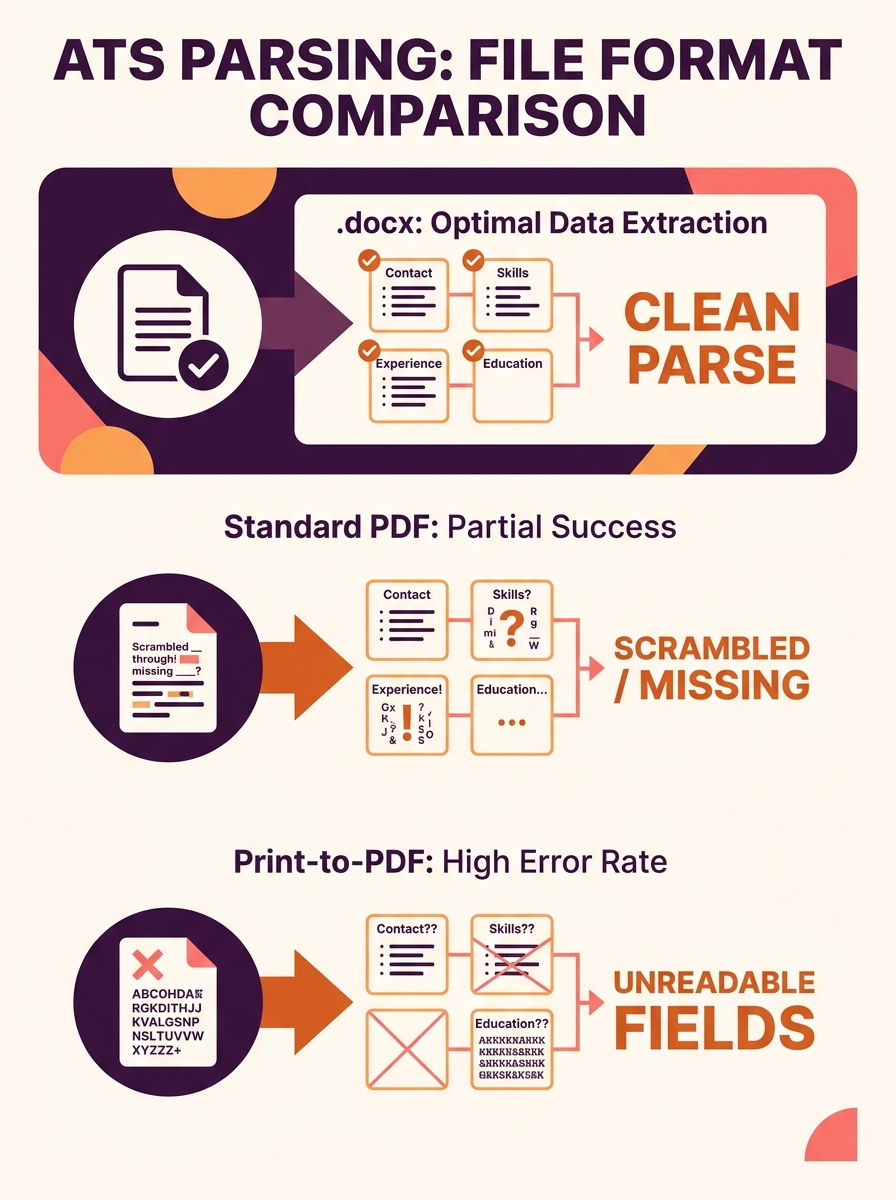
A Reddit user who spent eight months testing how different ATS platforms parse resumes found that .docx files parsed reliably 100% of the time across Workday, Greenhouse, and iCIMS. PDFs had edge-case failures, particularly when created via “Print to PDF” instead of “Save As,” because the resulting file can lack a proper text layer. The system sees a flat image instead of extractable text, and the candidate’s entire resume effectively becomes blank.
This is where resume format compatibility starts to matter far more than design aesthetics. Templates from Canva, Google Docs export quirks, and even Microsoft Word’s own table-based layouts can inject hidden formatting that the parser can’t untangle. As one ATS formatting guide from Ohio Northern University puts it plainly: avoid templates, which are a combination of fields and tables and can confuse ATS systems.
Date Formats, Fonts, and the Small Things That Zero Out Scores
The eight-month Reddit testing project surfaced a particularly painful example. Candidates with eight years of work experience were showing up in ATS databases with only three years, because they used inconsistent date formats across different job entries. Mixing “Jan 2019,” “2019-01,” and “January ’19” within the same document caused the parser to miscalculate total tenure. The tester’s recommendation, backed by results across multiple platforms: “Month Year” (e.g., “Jan 2020 – Mar 2023”) parsed most reliably.
Fonts cause similar silent failures. Non-standard fonts, symbols, and special characters like decorative bullets and arrows may not convert properly during parsing, garbling the information or making entire sections unreadable. A phone icon that looks professional to a human reader shows up as Unicode gibberish (or nothing at all) to the parser, which means the candidate’s contact number disappears.
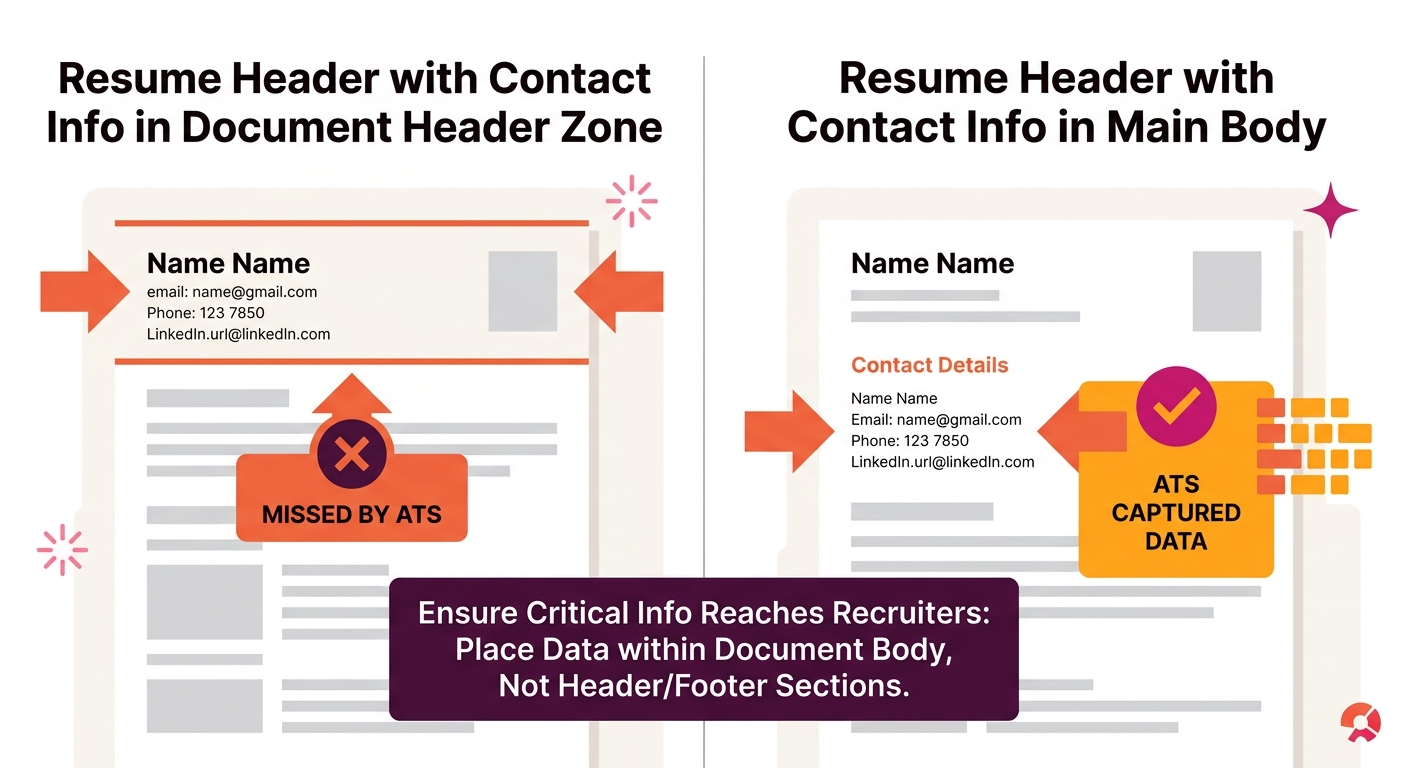
And the contact information issue goes deeper than icons. Jobscan’s research on common formatting mistakes confirms that hiding contact info in a header or footer causes the parser to skip it entirely. The candidate’s qualifications might parse fine, but the recruiter has no way to reach them.
If you’re running an ATS for your hiring pipeline, these aren’t candidate problems you can ignore. They’re data quality problems that directly affect your ability to fill roles.
Where Recruiters Lose the Thread
There’s a common assumption that parsing failures are the candidate’s problem to solve. And to some extent, that’s true from the candidate’s perspective. But from the recruiter’s side, the math works against you. If job applications surged 31% while openings grew only 7% (per Workday’s Global Workforce Report), you’re relying more heavily on automated filtering to manage volume. Every parsing failure that scores a qualified person at zero is a failure in your pipeline, not theirs.
A survey of 630 recruiters found that 92% of ATS systems don’t auto-reject candidates. They make them invisible. The distinction sounds academic until you realize your top hire might be sitting in your database right now, scored at zero.
The consequences compound in specific, measurable ways. Forbes reported that this dynamic systematically reduces diversity and excludes capable candidates with non-traditional backgrounds before any human makes a decision. Candidates who learned English as a second language, switched careers mid-stream, or come from industries with different titling conventions are disproportionately affected. The Verge’s coverage of this problem found that the failures generally stem from the use of overly-simplistic criteria to divide “good” and “bad” applicants.
So when you’re wondering why your candidate pool feels thin despite high application volume, missing qualified candidates to parsing errors is a real and documented explanation. Your recruitment analytics dashboard might show healthy application counts while the actual pool of surfaced, reachable candidates shrinks.
Fixing the Problem From Both Sides
The data points toward specific interventions, both for the systems recruiters control and for the candidate-facing guidance they can provide.
On the recruiter and system side
If you’re evaluating recruitment software for growing teams, parsing reliability should be near the top of your criteria list. Not every ATS handles document parsing the same way, and the differences show up directly in candidate surfacing rates.
Concrete steps that the data supports:
- Audit your current parsing accuracy. Take ten recently submitted resumes, pull up the parsed data in your ATS, and compare it to the original documents. If more than one or two have scrambled fields, missing dates, or blank contact info, you have a systemic issue.
- Accept .docx as the default. If your system allows you to specify preferred upload formats, prefer .docx. The testing data is clear on this point.
- Set up automated notifications for incomplete parses. Some systems can flag when key fields (email, phone, job title) fail to populate. Build a workflow to review those manually instead of letting them sit at zero.
- Periodically search for zero-score profiles. Run a query for candidates who applied to roles they appeared qualified for (based on job title or keyword) but scored poorly. Manual review of even a small sample can reveal parsing patterns specific to your system.
On the candidate guidance side
If you publish a careers page or application instructions, include formatting guidance. Companies that specify file formats and warn against headers, tables, and creative layouts see fewer parsing failures. Your career page is the right place for this.
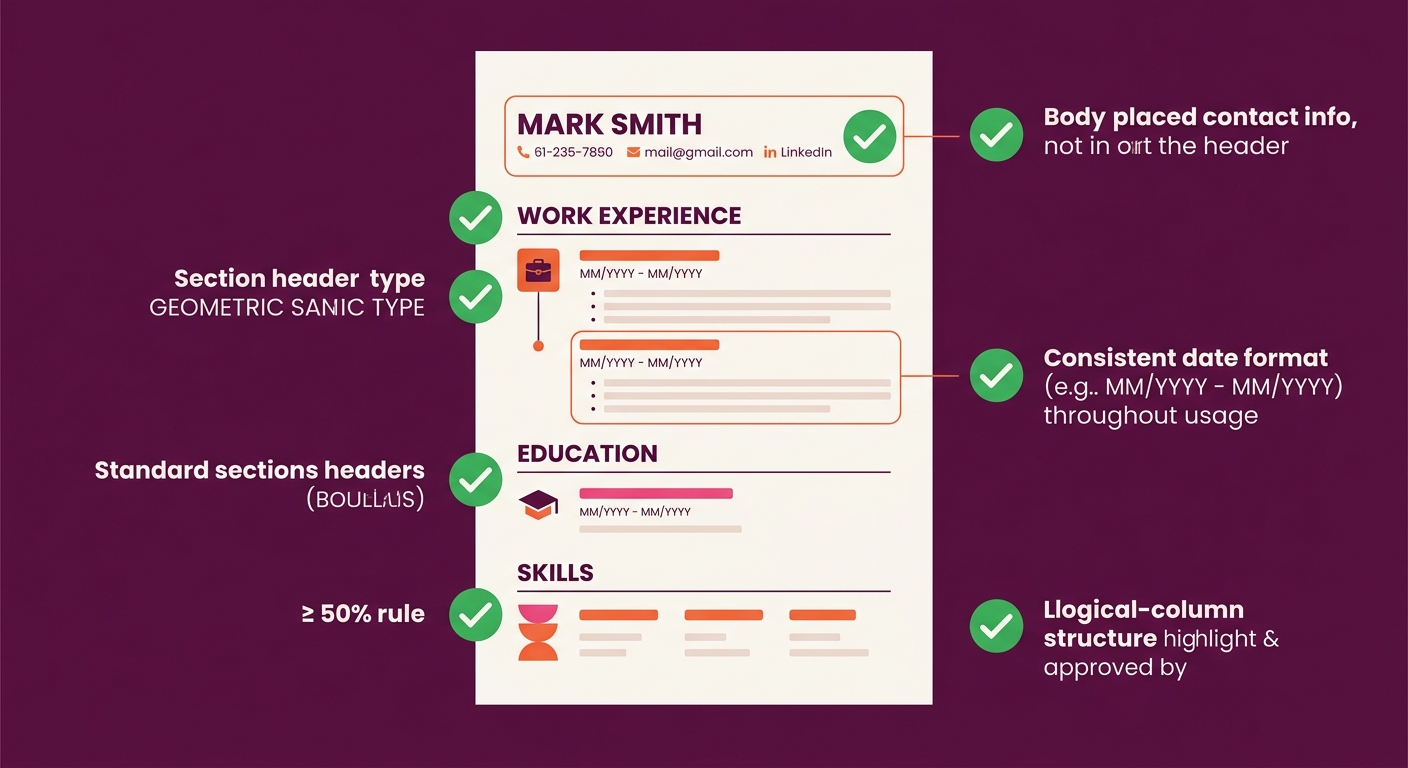
Based on the aggregate testing data, the formatting rules that make the biggest difference are:
- Single-column, left-justified layout with no text boxes or tables
- Contact information placed in the document body, not the header or footer
- Standard section headings (“Work Experience,” “Education,” “Skills”) rather than creative alternatives
- Consistent “Month Year” date formatting throughout
- Standard fonts (Arial, Calibri, Times New Roman) and standard bullet characters
Tip: A quick test for candidates: copy all resume text and paste it into a plain text editor. If content is out of order, duplicated, or missing, the ATS parser will have the same problem. This single step catches the majority of formatting issues before submission.
Integrating DEI and Analytics to Catch What Parsing Misses
One dimension of this problem deserves its own call-out. If parsing failures disproportionately affect candidates with non-traditional backgrounds, they create a measurable bias in your hiring funnel. Teams that have integrated DEI analytics with their ATS can actually track whether certain demographic groups are being surfaced at lower rates. When those rates diverge from application rates, parsing problems are one of the first places to investigate.
The same logic applies to interview scheduling software. If candidates never get surfaced by the parser, they never reach the interview stage, and your scheduling data will show a pipeline that looks normal but is actually pre-filtered by formatting accidents.
Questions The Numbers Still Can’t Answer
The data makes a strong case that parsing failures are widespread and that specific formatting choices cause predictable problems. But several gaps remain.
Nobody has published a rigorous, controlled study measuring exactly what percentage of total applicants are incorrectly scored at zero due to parsing failures. The 92% “invisible not rejected” statistic tells us the mechanism exists, but not the scale. We know anecdotally that it’s significant. We don’t have a precise industry-wide number.
We also don’t have good comparative data across ATS platforms. The eight-month Reddit study tested several major systems but wasn’t conducted under controlled academic conditions. Workday’s Illuminate, Greenhouse’s parsing engine, and iCIMS all behave differently, and the differences matter if you’re choosing between them.
And the arms race between AI-powered scoring and candidate optimization tools introduces its own unknowns. ResumeOptimizerPro reported in May 2026 that modern ATS software now uses machine learning to detect keyword manipulation, penalizing tactics like white-text keyword stuffing. But where the line falls between legitimate optimization and manipulation varies by platform and changes over time.
What’s clear from the data is that the problem is real, the causes are well-documented, and the fixes are mostly unglamorous: better file formats, simpler layouts, consistent dates, and periodic manual audits of your parsed data. The candidates are applying. The question is whether your system can actually see them.