
Knockout questions are binary pre-screening filters inside your applicant tracking system that auto-reject candidates failing hard requirements like work authorization, licensure, or shift availability. Configured correctly, they eliminate 30–60% of unqualified applications before a recruiter opens a single resume. Configured carelessly, they silently discard the people you actually want to hire.
TL;DR: Most ATS knockout question problems come from the same six mistakes: screening for preferences instead of requirements, using exact-match cutoffs for experience, conflating parsing with screening, never testing as a candidate, skipping rejection-rate audits, and writing ambiguous question text. Fix those six, and your candidate screening logic gets dramatically better overnight.
The rules below apply whether you’re running a mid-market ATS with 100 applicants per role or a high-volume system pulling 200+ per posting. Each one addresses a specific, common misconfiguration, and each one has situations where it bends.
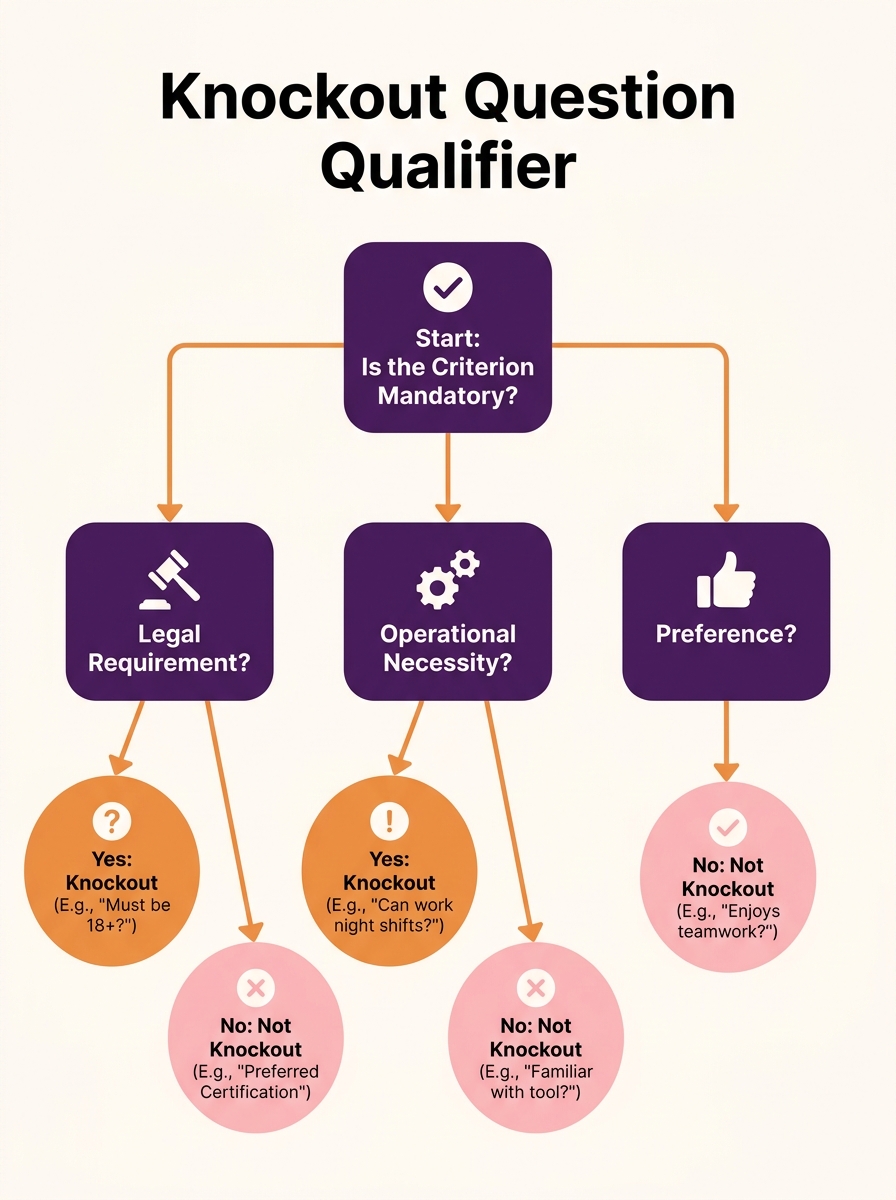
Limit knockout questions to true legal or operational minimums
Every knockout question should map to a binary, non-negotiable requirement. “Are you authorized to work in the US?” qualifies. “Do you have a CDL?” qualifies for a driving role. “Can you work weekends?” qualifies for a weekend-shift position. As Truffle’s hiring guide describes, these are “the automated yes/no gate at the top of your hiring process” that filters “out the obvious mismatches before you spend a single” minute reviewing applications.
The failure pattern is treating ATS knockout questions as a wish list. A posting for a marketing coordinator shouldn’t auto-reject someone without HubSpot certification. That’s a preference, not a floor. SAP’s ATS documentation recommends configuring pre-application screening questions on a per-posting basis, which means each role should get a tailored, minimal set of gates.
A reasonable ceiling: 3–5 knockout questions per posting. If your list runs to 8 or more, you’re almost certainly screening for nice-to-haves and auto-rejecting strong candidates who would have performed well. According to Treegarden’s analysis, a mid-volume role receiving 100 applications where 40% of candidates lack a required Right to Work means 40 resumes that never needed review. At an average review time of 3 minutes per CV, that’s 120 minutes of recruiter time saved per role with just one well-placed knockout question.
Use dropdown ranges for experience instead of hard cutoffs
Exact-match experience cutoffs are the most common pre-screening filter mistake. Setting “Must have exactly 6 years of experience” as a knockout criterion discards a candidate with 5 years and 11 months, even though the difference is meaningless.
Core Matters’ hiring process guide recommends using dropdown ranges so your ATS can automate the results more flexibly: “If you ideally want someone with six years of experience, you may want to knockout applicants who have less than three years of experience, but consider candidates in the range of 3–5 years based on how their interview goes.”
This approach creates three tiers inside your applicant tracking configuration:
| Experience Range | ATS Action | Recruiter Action |
|---|---|---|
| 0–2 years | Auto-reject | None needed |
| 3–5 years | Pass through | Review; interview if strong |
| 6+ years | Pass through | Priority review |
The tier structure preserves the screening function while giving recruiters a wider pool. For roles where 200+ applications come in, the bottom tier still eliminates a significant share of candidates. But it doesn’t throw away the 4-year candidate whose portfolio outshines everyone else.
Tip: If your ATS only supports yes/no knockout logic and doesn’t allow ranges, set the knockout threshold at the absolute minimum (e.g., 3 years), and use manual sorting or Boolean filters to prioritize candidates with 6+ years from the remaining pool.
Separate knockout logic from resume parsing
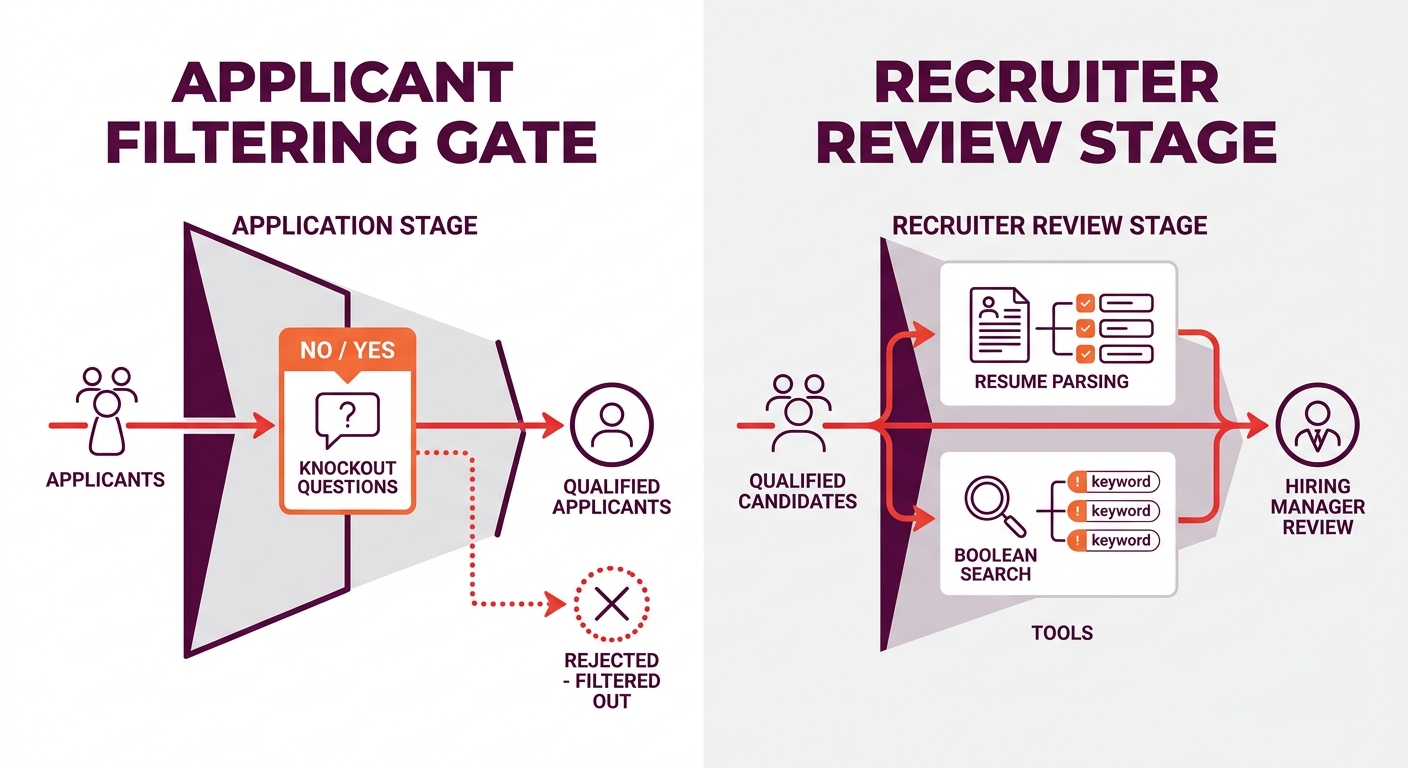
Knockout questions and resume parsing serve different functions, but teams frequently confuse them during ATS setup. Knockout questions ask the candidate to self-report a specific fact (“Do you hold a PMP certification?”). Resume parsing extracts data from uploaded documents. When both systems are misconfigured, they compound each other’s errors.
Jobscan’s ATS overview notes that systems support Boolean logic operators like AND, OR, and NOT for searching parsed resume data (“Java AND (Spring OR Hibernate) NOT Junior”). But that Boolean filtering is a recruiter search tool applied after candidates enter the pipeline. Knockout questions operate before the pipeline, at the point of application. Conflating the two means you might auto-reject a candidate based on a knockout question about PMP certification while also having resume parsing failures that miss the certification listed on their uploaded document.
Knockout questions guard the gate. Resume parsing organizes what comes through. Mixing up which tool does what creates silent rejection patterns no one on the team notices.
The practical fix: reserve knockout questions for 3–5 items you absolutely need a yes/no answer to. Use Boolean search and parsed-resume filtering for everything else, where a recruiter can apply judgment.
Test your filters from the candidate side before launch
The ATS admin view and the candidate-facing application form are two different experiences. A question that looks clear to the hiring manager can read as ambiguous to a job seeker. Forward Motion Careers’ ATS guide warns that candidates encounter technical questions spanning “literacy, math, science, and questions that are specific to the job itself,” and unclear wording on any of these can lead to accidental self-disqualification.
Before activating knockout questions on any posting, go through the full application yourself. Time it. Read each question the way a candidate would, not the way HR wrote it. A question like “Do you have relevant experience?” is too vague to serve as a pre-screening filter because “relevant” means different things to different people. A question like “Do you hold an active RN license in the state of Texas?” is unambiguous.
Understanding the candidate journey from first click to submission reveals where confusing wording, redundant fields, or broken form logic pushes people to abandon applications. Roughly 92% of candidates who start online applications never finish them, according to multiple industry benchmarks, and every unnecessary or confusing knockout question adds friction to that already fragile process.
Audit rejection rates every 30 days
Applicant tracking configuration is a set-and-forget task at most companies. Someone builds the knockout questions during initial ATS setup, and nobody looks at the data again for 6–12 months. By then, the role has changed, the market has shifted, and the filters are auto-rejecting candidates who would now be strong hires.
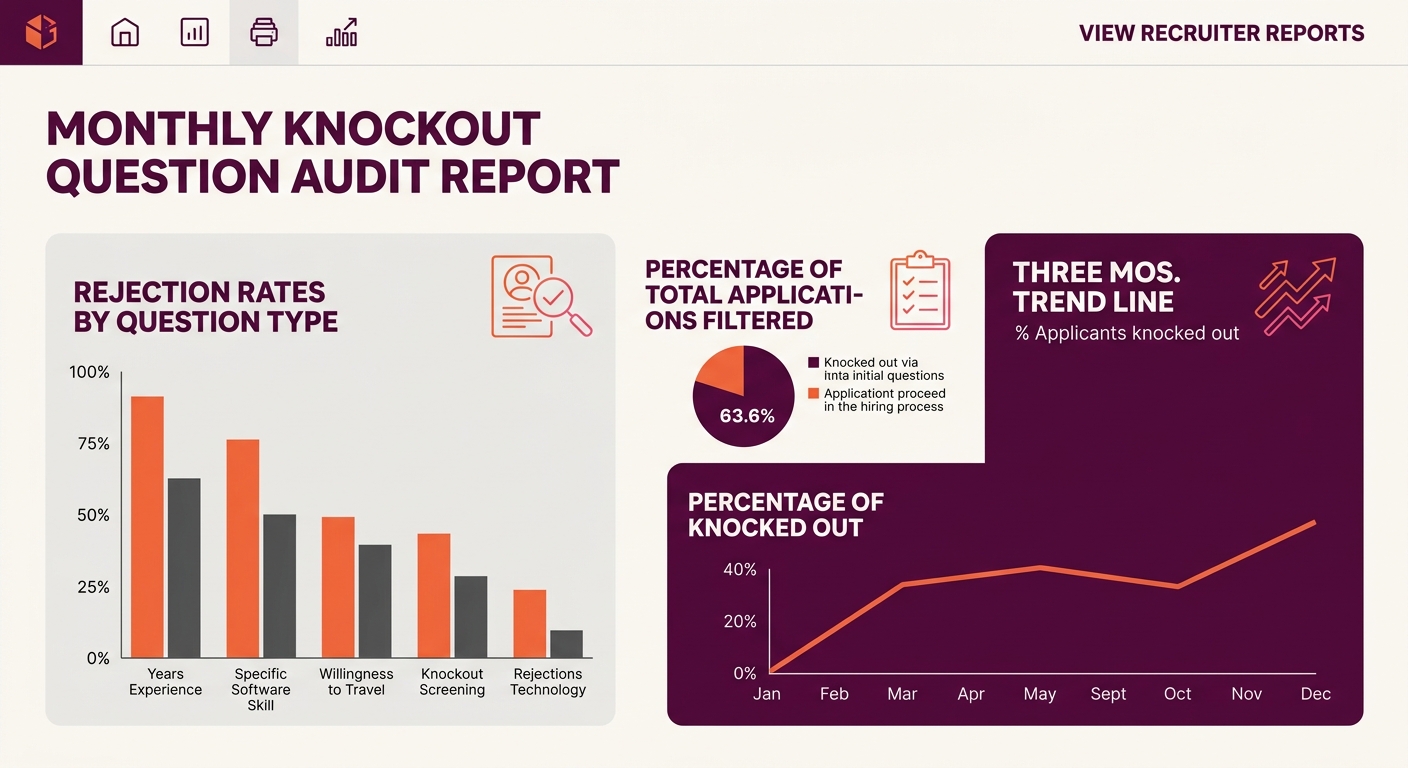
A monthly audit takes 15–20 minutes per active posting. Pull these three numbers from your ATS:
- Total applications received for each role that month
- Percentage auto-rejected by knockout questions
- Which specific question triggered the most rejections
If a single knockout question is responsible for 50%+ of rejections, something is wrong. Either the question is poorly worded (candidates are answering incorrectly), the requirement has drifted from the actual job, or the talent market for that skill has tightened enough that you need to revisit the minimum.
The real ROI of recruitment automation depends on these feedback loops. Automation that eliminates 40 unqualified candidates per role per month generates clear time savings. Automation that eliminates 40 candidates you never checked is a liability masquerading as efficiency.
And consider the downstream effects. Once a candidate passes your knockout questions and moves into interviewing, you want that pool to be qualified and diverse enough to produce strong hires. If your pre-screening filters are too aggressive, every later stage of the hiring process suffers because the input pool was artificially narrow.
Write the question exactly as the candidate will read it
The phrasing of your knockout questions determines whether they function as accurate screening or as traps. Simplicant’s analysis of ATS knockout question best practices emphasizes that the goal is to “quickly and easily identify and eliminate candidates who do not meet the minimum requirements for the job,” and that only works when candidates understand what’s being asked.
Three wording principles for effective candidate screening logic:
- Use the same terminology the candidate uses. If the industry calls it a “Class A CDL,” don’t write “commercial driving credential.” If the role requires “FINRA Series 7 licensing,” spell it out, including the number.
- Specify geography when it matters. “Are you licensed to practice law?” is vague. “Are you admitted to the bar in California?” is specific. The difference between these two questions is the difference between screening accurately and screening randomly.
- Avoid double-barreled questions. “Do you have a bachelor’s degree and 5 years of experience?” forces a candidate with a master’s degree and 3 years of experience to answer “no,” even though they might be exactly the person you want. Split compound requirements into separate questions so each one functions as an independent filter.
Warning: If your knockout question contains the word “and” or “or,” it’s likely doing two jobs at once. Break it into separate questions so you can track which requirement is actually causing rejections.
Details like these might seem minor compared to the bigger decisions in building a hiring process, similar to how the specifics of finding gifts for a new hire’s welcome package seem small next to compensation and role design. But small configuration choices compound. A poorly worded knockout question on a high-volume posting can silently reject hundreds of qualified people over a quarter.
When These Rules Break Down
These six rules assume a standard hiring workflow: inbound applications, ATS pre-screening filters, recruiter review, interviews, offer. They fit most roles at most companies.
They bend when you’re hiring for highly regulated positions (healthcare, finance, government contracting) where the list of non-negotiable requirements genuinely runs to 8–10 items and dropdown ranges aren’t appropriate because every credential is binary. In those cases, a longer list of knockout questions is justified, but you should still audit monthly and test from the candidate side.
They also bend for very small applicant pools. If a role typically draws 15–20 applications, knockout questions add friction without meaningful time savings. At that volume, a recruiter spends 45–60 minutes reviewing every application manually, and that’s a reasonable investment. The automation payoff kicks in when you’re consistently above 50–100 applicants per posting.
The underlying principle holds regardless of scale: your ATS setup should filter for what the job actually requires, not for what the hiring manager wishes the perfect candidate looked like. Every knockout question that goes beyond a true minimum is a bet that disqualifying more people is worth missing the ones who would have worked out.