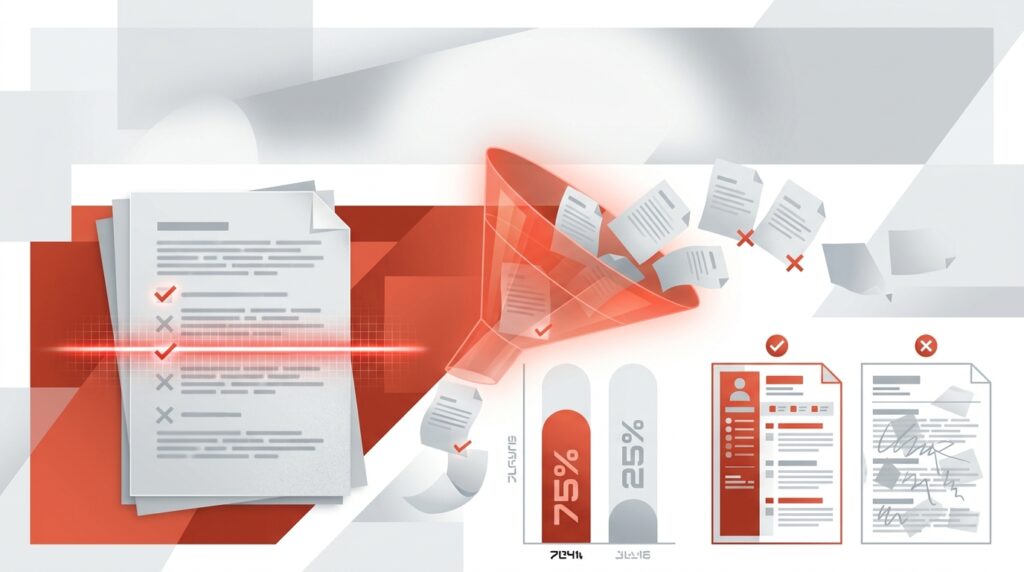

Coordinating panel interviews can be a tedious process, but automation tools are changing the game. These systems sync with calendars like Google or Outlook, find overlapping availability, and allow candidates to self-schedule. The result? Less back-and-forth, faster scheduling, and fewer no-shows. In 2026, with 70% of job seekers expecting online scheduling, automation is no longer optional – it’s essential for saving time, improving efficiency, and keeping top talent engaged.
Key Takeaways:
- Automation reduces scheduling time by up to 5 hours per hire.
- Features like AI-driven calendar syncing, load balancing, and automated reminders streamline the process.
- Companies see a 40% faster time-to-hire and save 20–40% on hiring costs.
- Tools like Skillfuel offer self-scheduling, real-time updates, and mobile-friendly interfaces.
Automation not only saves recruiters time but also enhances the candidate experience, making it a must-have for modern hiring teams.
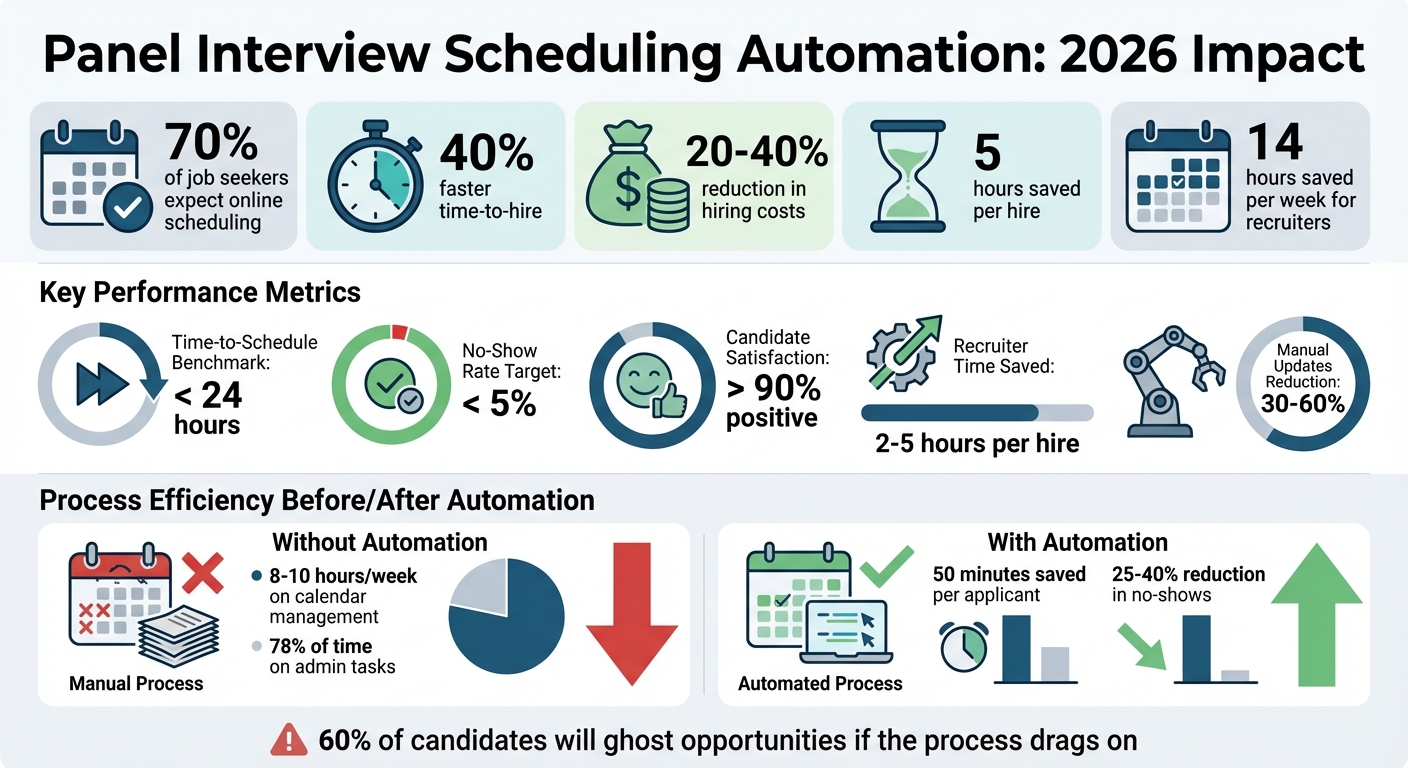
Panel Interview Scheduling Automation Benefits and ROI Statistics 2026
Key Features of Panel Interview Scheduling Tools
A reliable scheduling tool can make panel interviews far less stressful. The best tools focus on tackling major challenges like coordinating multiple calendars, avoiding interviewer fatigue, and minimizing manual scheduling efforts. These features are essential for a smoother and more efficient interview process.
Interviewer Load Balancing and Panel Coordination
Scheduling tools help distribute interview assignments fairly by using methods like round-robin routing and "interviewer pools". This ensures that no single hiring manager ends up overloaded while others have fewer responsibilities. Advanced tools also check multiple calendars simultaneously to find common availability. Many platforms now include smart buffers, which automatically block 10–30 minutes before and after interviews. These buffers give panelists time to prepare, debrief, or simply catch their breath, avoiding the exhaustion of back-to-back sessions.
AI-Powered Scheduling and Time Zone Support
AI simplifies the scheduling process by analyzing real-time availability across platforms like Google Calendar, Outlook, and Microsoft 365. This ensures meetings are booked at times that work for everyone involved. If a panelist cancels at the last minute, AI steps in to recommend replacements based on their availability and expertise. For global teams, time zone detection eliminates the hassle of manual conversions by showing all available slots in each participant’s local time. Candidates can schedule interviews at any time, keeping the process moving smoothly across different regions. These AI-driven features work seamlessly with other tools to streamline the entire scheduling experience.
Automated Reminders and Integration Capabilities
Automated reminders, sent via email or SMS at intervals like 24 hours and 2 hours before interviews, can cut no-show rates by 25% to 40%. However, these reminders are only effective if calendars stay properly synced. Look for tools with two-way integration for platforms like Google Calendar, Outlook, and iCal, as well as built-in connections to applicant tracking systems (ATS) such as Greenhouse or Lever. Test this integration by making a quick calendar update to ensure changes reflect instantly. Additionally, the system should be able to auto-generate video conferencing links for tools like Zoom, Microsoft Teams, or Google Meet and insert them directly into invitations. Since most candidates schedule interviews using their phones, ensure the scheduling interface is mobile-friendly. These features create a better experience for both candidates and recruiters, making the interview process more efficient and user-friendly.
sbb-itb-e5b9d13
Benefits of Automating Panel Interview Scheduling
Automating the scheduling process can save recruiters up to five hours per hire, freeing them to focus on what truly matters: evaluating candidates and building meaningful connections. This efficiency boost significantly impacts hiring timelines. Companies that streamline their scheduling processes often see a 40% reduction in time-to-hire, while automated workflows can shave off as much as 50 minutes per applicant. Self-service scheduling tools also cater to the 24/7 convenience that candidates expect today. By allowing applicants to book interviews in their local time zones, automation meets the preferences of 70% of job seekers who now consider online scheduling a standard feature. These improvements not only speed up the process but also enhance team collaboration.
Faster Scheduling and Fewer No-Shows
Gone are the days of endless email exchanges to coordinate interview times. Automation tools instantly scan interviewer calendars and present candidates with available slots. If a candidate needs to reschedule, they can do so via a simple link, which automatically updates all calendars and the applicant tracking system (ATS) – no recruiter involvement required. These tools also help maintain low no-show rates, typically below 5%, by instantly syncing calendars and sending automated reminders 24 hours and two hours before interviews. This seamless process ensures interviews stay on track with minimal disruption.
Better Collaboration for Recruitment Teams
Centralized platforms streamline recruitment workflows by consolidating candidate status updates and feedback, cutting manual updates by 30–60%. AI-powered load balancing further supports teams by evenly distributing interview assignments based on workload and expertise. This prevents burnout and ensures fairness in task allocation. Additionally, smart scheduling buffers – 15 to 30 minutes between interviews – give panelists time to debrief, review notes, and prepare for their next conversation, creating a smoother and more productive interview process.
Data-Driven Insights for Process Improvement
Automation doesn’t just make scheduling faster – it also provides valuable data to refine hiring strategies. Metrics like "time-to-schedule" (the time it takes to confirm an interview after advancing a candidate) and no-show rates highlight bottlenecks in the hiring pipeline. Top-performing teams aim to confirm interviews within 24 hours of moving candidates to the next stage. These analytics can uncover inefficiencies that manual processes might miss, such as delays in specific interview stages or time slots that lead to higher acceptance rates. By reducing administrative tasks – which often consume 78% of a recruiter’s time – automation allows teams to focus on high-impact activities like candidate evaluation and relationship building. This shift can lead to a 20–40% reduction in cost-per-hire, making the overall process more efficient and effective.
Skillfuel: Simplifying Panel Interview Scheduling
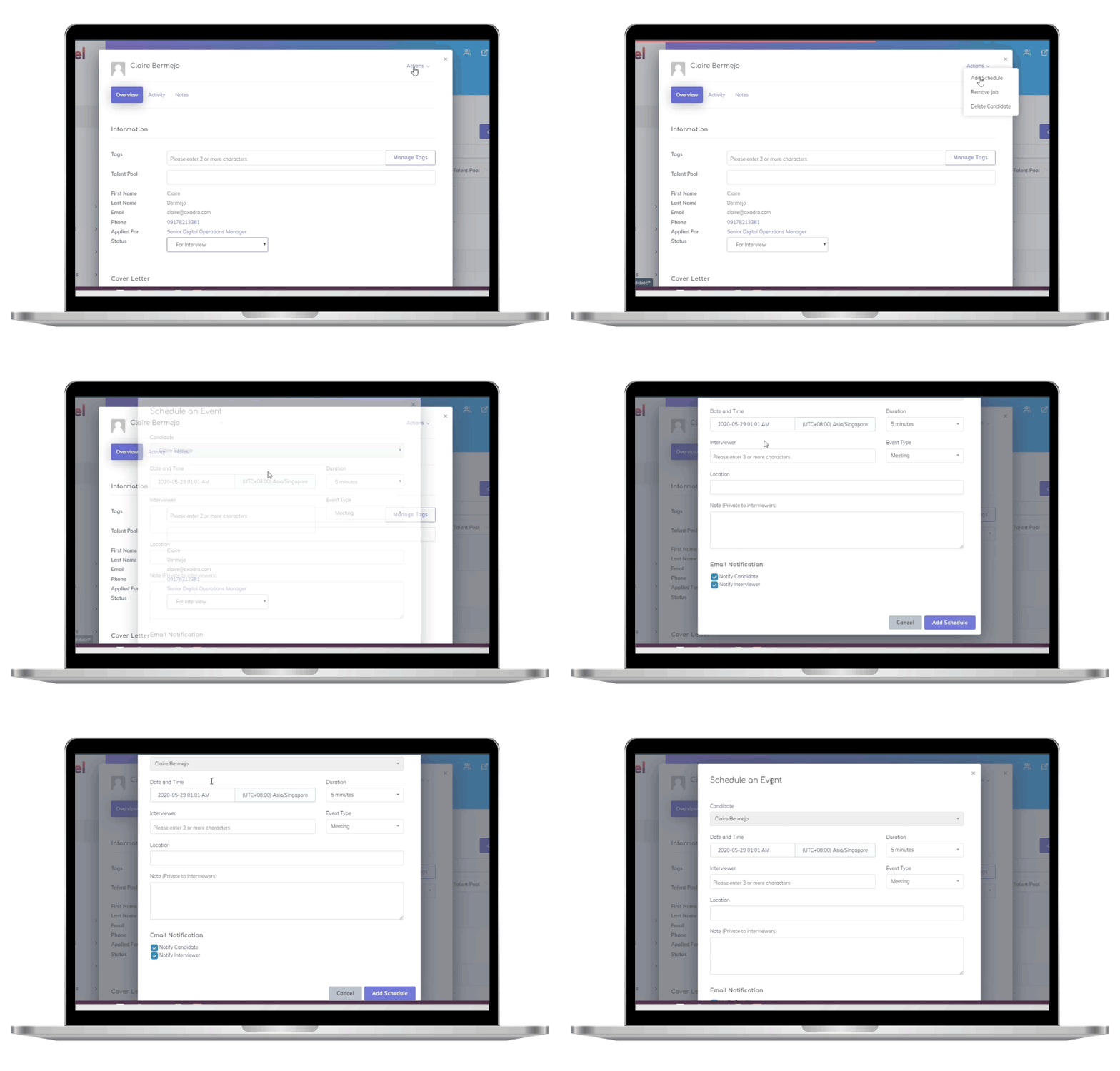
Skillfuel tackles the tricky process of automating panel interview scheduling with a smart, user-friendly approach. This web-based recruitment management platform uses AI-driven interviewer selection paired with calendar syncing for Gmail and Outlook. By eliminating the need for manual availability checks, it streamlines the process for recruiters. Instead of juggling schedules for hours, recruiters can quickly match interviewers to candidates based on technical skills. From there, candidates can select a time that works for them from pre-verified options. These features form the backbone of Skillfuel’s time-saving tools.
Key Features of Skillfuel for Panel Interview Scheduling
Skillfuel is built to handle the challenges of multi-session and panel interviews with ease. One standout feature is the ability to set "alternate" and "optional" interviewer rules, ensuring interviews proceed smoothly even if a primary panelist is unavailable. Once candidates choose their interview slots, the system updates all connected calendars and the ATS in real time. It even schedules a post-interview debrief meeting to ensure feedback is gathered promptly. The Kanban-style dashboard offers a clear, visual way to manage workflows, making it simple to identify and address scheduling bottlenecks.
How Skillfuel Improves the Candidate and Recruiter Experience
Candidates get the convenience of self-scheduling their interviews, avoiding endless back-and-forth emails. Automated invites, confirmations, and reminders are sent to both candidates and hiring managers, helping to maintain low no-show rates – a hallmark of automated systems. For recruiters, the platform translates into big time savings, cutting up to 50 minutes of effort per applicant. All panel feedback is centralized, making it easier for teams to collaborate on hiring decisions. And because Skillfuel is mobile-responsive, recruitment tasks can be managed anytime, anywhere, whether in the office or remotely. These efficiencies are paired with flexible pricing options, making the platform accessible to teams of all sizes.
Skillfuel’s Pricing and Scalability for HR Teams
Skillfuel offers a free plan that includes essential tools like applicant tracking, interview scheduling, and job portal creation – perfect for startups or small businesses with limited hiring needs. For more advanced features like analytics and enhanced collaboration tools, the Premium Plan offers custom pricing based on usage. Larger enterprises can opt for the Enterprise Plan, which comes with dedicated support and custom integrations. With its usage-based pricing model, Skillfuel scales alongside your hiring needs, and a free trial lets teams explore the platform’s automation features before committing to a paid plan.
Best Practices for Implementing Panel Interview Scheduling Automation
Mapping Your Workflow and Identifying Bottlenecks
Before diving into automation, take a close look at your current scheduling process. Pinpoint the bottlenecks – whether it’s waiting for hiring managers to provide availability or spending hours coordinating multi-person panels. On average, recruiters dedicate 8 to 10 hours a week just managing calendars.
Build specific workflows tailored to each interview stage. For instance, scheduling a quick phone screen is very different from coordinating a 90-minute technical panel. Define the details for each stage, such as duration, required attendees, and the candidate information needed. It’s also important to set clear service level agreements (SLAs). For example, you might aim to send scheduling links to qualified candidates within 24 hours of advancing them to the next stage. Track key baseline metrics like time-to-hire, no-show rates, and hours spent on manual coordination. These will help you measure the system’s impact once it’s live. Laying this groundwork ensures smoother implementation and helps your team continuously improve.
Training and Onboarding Recruitment Teams
A phased, four-week approach works well for training. Start by having one tech-savvy recruiter test the system in week one, identifying any potential issues. In week two, focus on creating reusable templates for common scenarios like phone screens, technical interviews, and final panel discussions. By week three, roll out a 30-minute training session for the entire team. Cover the essentials: creating scheduling links, customizing availability, and managing rescheduling requests. In the final week, integrate the tool with platforms like Slack to enable instant notifications.
Record all training sessions so new team members can access them later. To maintain a personal touch, send candidates automated scheduling links via personalized emails. With 70% of candidates booking interviews on mobile devices, make sure your team tests these links on both iOS and Android during training. A well-prepared team ensures efficient scheduling and smooth operations.
Monitoring and Optimizing the Scheduling Process
Keep an eye on key metrics to ensure your scheduling process stays on track. Aim for a time-to-schedule of under 24 hours from initial outreach to a confirmed interview. Your no-show rate should stay below 5%. Pay attention to how often candidates use self-service links to reschedule. If reschedule rates are high, it could mean that your initial time slots don’t align well with candidate availability. Additionally, monitor interviewer utilization to prevent burnout and ensure panel members are rotated regularly.
| Metric | Definition | 2026 Industry Benchmark |
|---|---|---|
| Time-to-Schedule | Time from first outreach to confirmed booking | < 24 hours |
| Interview No‑Show Rate | Percentage of candidates missing scheduled interviews | < 5% |
| Recruiter Time Saved | Hours saved per hire from manual coordination | 2–5 hours |
| Candidate Satisfaction | Feedback on scheduling clarity and ease | > 90% positive |
Use automated surveys to collect real-time feedback from candidates right after they book their interviews. This approach helps you catch potential issues early. Use the insights to refine your automation rules – adjust buffer times, update interviewer pools, and tweak templates as needed. These adjustments not only improve workflows but also enhance training practices, creating a continuous feedback loop. Companies that optimize their scheduling process often see a 40% reduction in time-to-hire, making active monitoring and regular updates critical to success. Regular adjustments ensure your automation evolves alongside your recruitment needs.
Conclusion
Panel interview scheduling automation has become a game-changer for recruitment teams in 2026. The traditional manual process – endless emails, phone calls, and juggling calendars – can eat up nearly five hours per hire. Automation takes this burden off recruiters, allowing them to focus on what really matters: connecting with top talent and driving hiring strategies.
The benefits are hard to ignore. Companies that automate their scheduling see a 40% faster time-to-hire. On top of that, AI-powered tools can cut recruitment costs by as much as 20% to 40%.
This also improves the candidate experience in big ways. Today, 70% of job seekers expect online scheduling options, and 60% admit they’ll ghost job opportunities if the process drags on. Features like self-scheduling, one-click rescheduling, and automated time zone adjustments ensure a smoother process for everyone involved. Plus, reminders for both candidates and interviewers reduce the risk of scheduling mishaps that can slow things down.
Key Takeaways
When choosing a scheduling tool, focus on deep integration. Look for a system that syncs seamlessly with both your ATS and team calendars (like Google or Outlook). AI-powered features such as interviewer load balancing and smart candidate matching can help avoid burnout while ensuring fair and thorough evaluations.
For example, Skillfuel offers a robust solution with AI-driven interviewer matching, real-time calendar updates, and centralized feedback collection. It can save recruiters up to 50 minutes per applicant while still maintaining a personalized touch for candidates. The platform also eliminates email chaos and provides flexible, usage-based pricing, including a free version.
Start small – test the tool with a single recruiter or a specific role before rolling it out company-wide. Use automation to add 15- to 30-minute buffers between interviews for debriefing. Track metrics like time-to-schedule (aim for under 24 hours) and no-show rates (keep them below 5%) to measure success. On average, automation can save recruiters 14 hours a week, freeing up time to focus on strategic hiring and building strong relationships with candidates.
FAQs
What’s the quickest way to roll out panel interview scheduling automation without disrupting hiring?
To streamline panel interview scheduling without slowing down your hiring process, consider using a recruitment platform like Skillfuel that includes built-in scheduling tools. Look for features like calendar integration (e.g., Google Calendar or Outlook) to ensure availability syncs effortlessly. Set it up to handle availability checks, send reminders, and manage scheduling automatically. Begin by testing it with a small number of interviews, track how it performs, and make adjustments as necessary to keep things running smoothly while maintaining your hiring pace.
How do I set up fair interviewer load balancing and buffers for panel interviews?
Automated scheduling tools make organizing individual panel events a breeze by allowing you to set up customized titles, descriptions, and resources for each event. These tools also offer flexible invite options, whether you need to invite participants for specific interviews or for an entire day. This helps balance workloads and ensures no one is overwhelmed.
Features like time zone management and automated reminders keep everything running smoothly, ensuring tasks are distributed fairly. Plus, built-in buffers between interviews help minimize scheduling conflicts and keep the process efficient from start to finish.
Which metrics should I track to prove scheduling automation ROI in 2026?
To showcase the return on investment (ROI) of scheduling automation in 2026, focus on tracking these key metrics:
- Time-to-schedule: Measure how much faster interviews are scheduled, from initial contact to confirmation.
- Time-to-hire: Monitor how automation shortens the overall hiring process, from posting the job to securing an accepted offer.
- Candidate experience: Evaluate improvements in satisfaction and engagement among candidates during the scheduling process.
- No-show rates: Track the reduction in missed interviews and scheduling conflicts.
- Workload reduction: Assess how much time is saved by minimizing manual scheduling efforts.
These metrics provide clear insights into efficiency gains and measurable benefits.