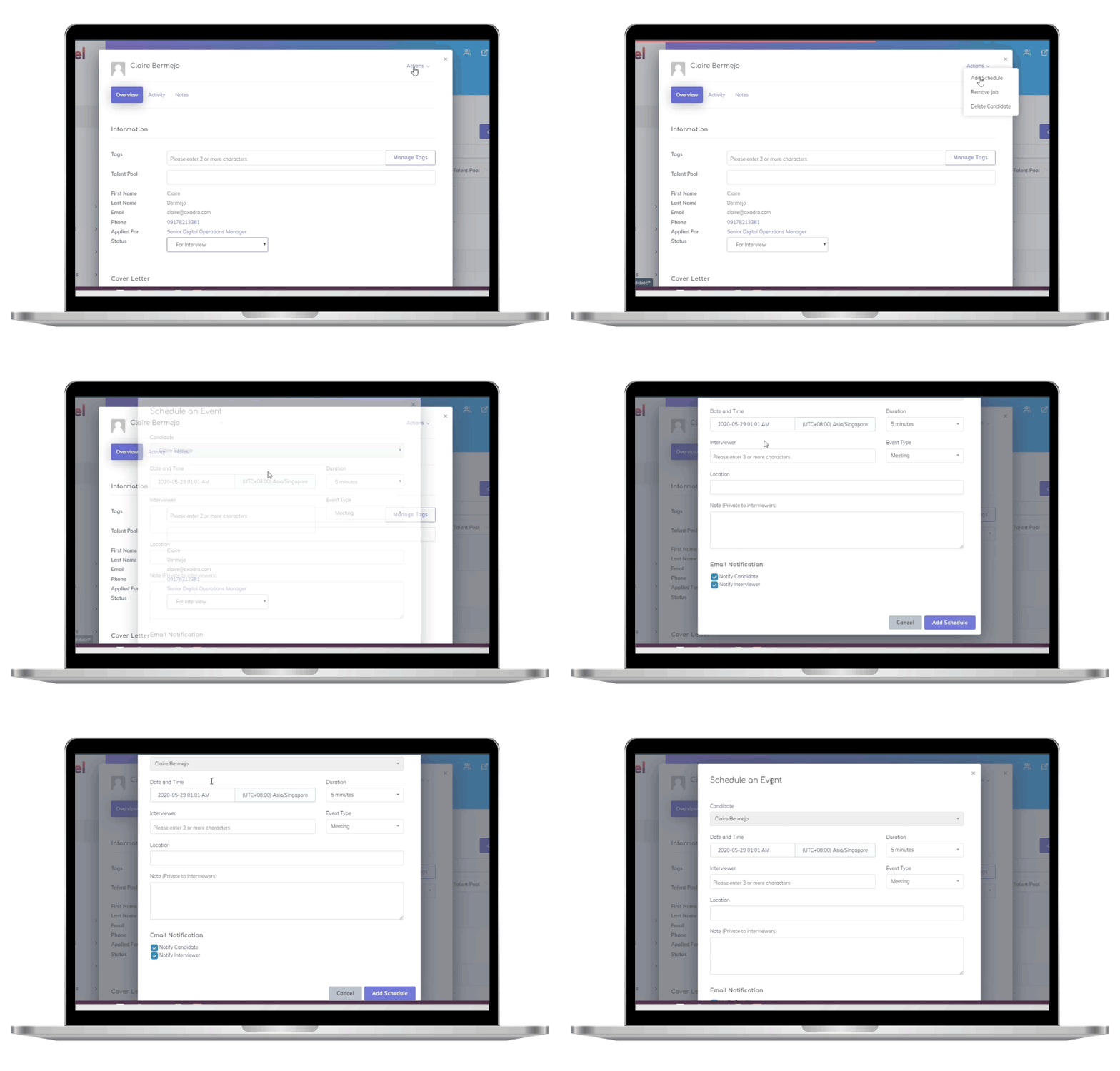

Integrating your ATS (Applicant Tracking System) with job portals simplifies recruitment by automating tasks like job postings and candidate tracking. Here’s why it matters:
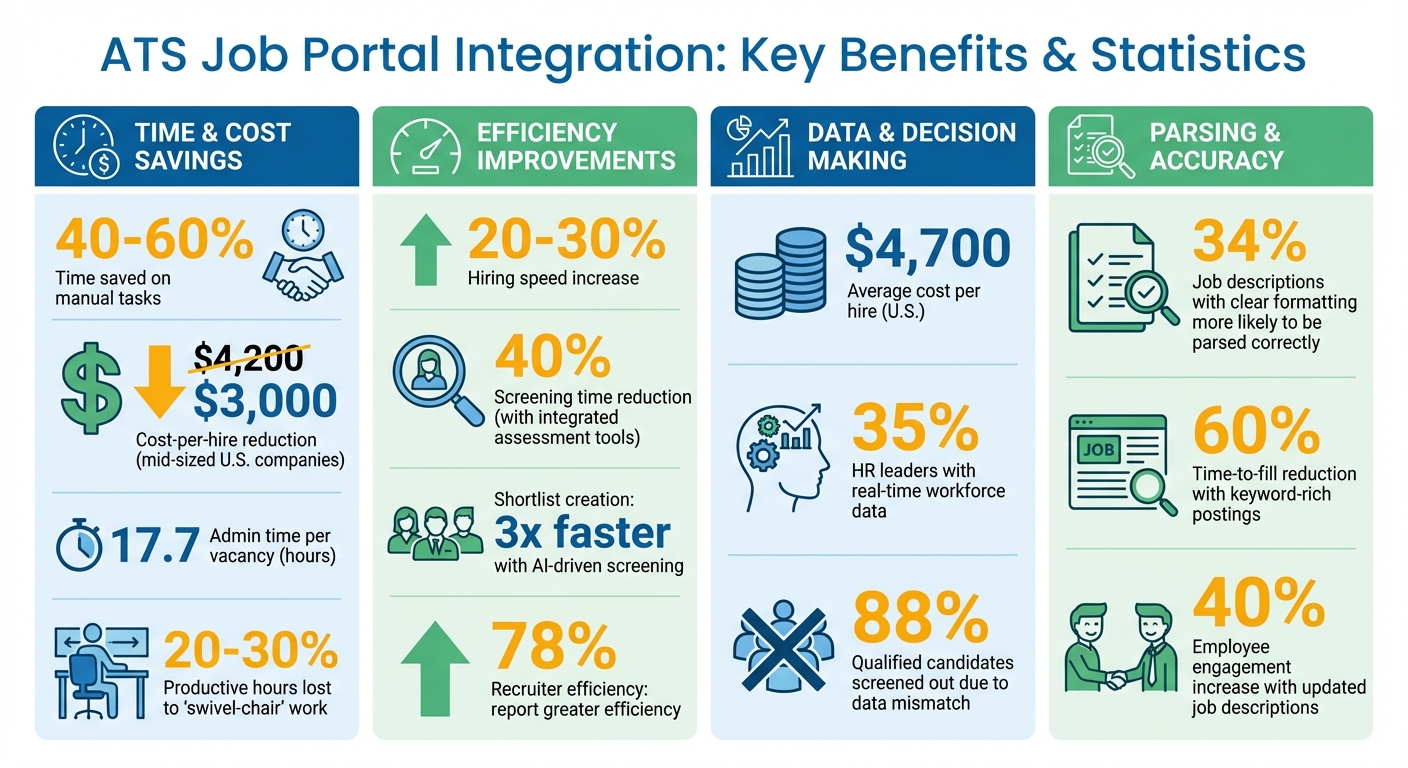
- Time Savings: Recruiters save 40–60% of the time spent on manual tasks, reducing cost-per-hire from $4,200 to $3,000 for mid-sized U.S. companies.
- Efficiency: Automates job distribution, consolidates applications, and updates candidate statuses in real time.
- Improved Hiring Speed: Integrated systems speed up hiring by 20–30%, helping companies stay competitive.
- Enhanced Candidate Experience: Features like one-click applications, real-time status updates, and automated scheduling reduce friction for applicants.
- Data-Driven Decisions: Centralized data helps recruiters track metrics like time-to-fill and cost-per-hire, ensuring smarter resource allocation.
How It Works: ATS integration creates a two-way data flow between your system and platforms like LinkedIn and Indeed. It uses APIs for secure, real-time syncing of job postings, applications, and candidate profiles. Features like resume parsing and event-driven workflows streamline the process further.
Steps to Implement:
- Evaluate your ATS and job portals for compatibility (APIs, compliance standards, etc.).
- Set up the integration using widgets or APIs.
- Test in a sandbox environment to ensure smooth operation.
Best Practices:
- Use clear, ATS-friendly job descriptions.
- Maintain consistent data formats.
- Monitor integration performance through dashboards.
ATS Job Portal Integration Benefits: Key Statistics and ROI Metrics
Indeed – An unexpected job board and ATS solution
sbb-itb-e5b9d13
How ATS Job Portal Integration Works
Automated recruitment has transformed hiring processes, and ATS (Applicant Tracking System) job portal integration is a key part of that evolution. This integration creates a two-way data flow between your ATS and external job boards. When you post a job, it’s automatically distributed to platforms like Indeed, LinkedIn, and Glassdoor. At the same time, candidate data flows back into your ATS, keeping everything centralized. This seamless exchange relies on automated systems that pull data from your ATS and update it with new candidate information.
Understanding the Data Flow
The integration manages the flow of jobs, candidates, and applications through real-time syncing. Here’s how it works:
- Jobs: Details like titles, descriptions, pay ranges, and locations are shared from your ATS to job boards.
- Candidates: Information such as names, contact details, resumes, and work history is exchanged between systems in both directions.
- Applications: These link candidates to specific jobs and track their progress through the hiring pipeline, from "New" to "Hired" or "Rejected."
Unlike batch processing, modern integrations rely on real-time synchronization. For example, if a recruiter updates a candidate’s status to "Interview Scheduled", that change is instantly reflected across all connected platforms. Incremental syncing – updating only the records that have changed – avoids the delays associated with older batch systems.
Key Integration Features
Some standout features of ATS job portal integration include:
- Automated job distribution: A single job posting in your ATS is instantly shared across all connected job boards, saving time and effort.
- Centralized application tracking: All resumes, cover letters, and application forms from various platforms are consolidated in one place.
- Resume parsing: Uploaded documents are automatically analyzed to extract structured details like skills and experience, helping to filter candidates more effectively.
Real-time updates ensure that when a candidate moves to the next stage, such as an interview, this change is immediately visible on their dashboard. According to industry data, 78% of recruiters using integrated ATS systems report greater efficiency in their hiring workflows. This automation also reduces manual entry errors, which can otherwise lead to costly mistakes.
The Role of APIs in Integration
APIs (Application Programming Interfaces) are the backbone of ATS job portal integration. They provide programmatic access to data, enabling job boards to retrieve postings and submit applications without manual exports. Most modern systems use RESTful APIs secured with OAuth2 or API keys, ensuring secure and reliable connections.
"ATS API integration exists to make [accurate, up-to-date hiring data] possible." – Unified.to
APIs also handle data normalization, which ensures consistency across different systems. For instance, one ATS might use "cand_id" while another uses "candidate_id." APIs map these variations into standard formats, making integration smoother. Unified API solutions can even connect to over 73 ATS platforms through a single interface.
Additionally, APIs support event-driven workflows using webhooks. These trigger immediate actions, like sending automated emails or updating dashboards, whenever a candidate progresses in the hiring process. Some systems use virtual webhooks to simulate real-time updates by polling source systems every minute. This level of automation ensures data accuracy while boosting the overall efficiency of recruitment operations.
Benefits of Integrating Job Portals with an ATS
Connecting job portals with an ATS brings measurable improvements to hiring workflows, candidate experiences, and data-driven decision-making in recruitment.
Improved Recruitment Workflows
Integration takes the grind out of repetitive tasks. Recruiters often spend 17.7 hours per vacancy on admin work like entering data, copying details between systems, and updating spreadsheets – essentially losing more than two full workdays per hire. By automating job postings to platforms like LinkedIn and Indeed and syncing candidate data automatically, integration frees up valuable time.
This also tackles the "swivel-chair" problem – constantly flipping between emails, spreadsheets, and job boards can eat up 20–30% of a recruiter’s productive hours. For companies using integrated assessment tools, candidate screening times drop by nearly 40%. This means hiring teams can zero in on qualified candidates faster, speeding up the entire process.
"An integrated ATS lets recruiters simplify operations, make smarter choices, and provide a top-notch candidate experience." – Nikita Saini, Author, Xobin
These time savings also contribute to a much smoother experience for candidates.
Better Candidate Experience
For candidates, the benefits are immediate. Integrated systems allow for one-click applications and mobile-friendly platforms that align with modern digital expectations. Instead of repeatedly entering the same information across different sites, candidates only need to submit their details once, and the system handles the rest – connecting job boards, assessment tools, and even video interview platforms.
Real-time dashboards keep candidates informed of their application status, eliminating the dreaded "black hole" where applicants feel ignored. Automated tools for interview scheduling let candidates choose their own time slots without endless back-and-forth emails. With AI-driven screening, some systems can create shortlists three times faster, reducing delays and keeping top candidates engaged in the process.
Data-Driven Decision Making
Integration transforms your ATS into a powerful analytics resource. By consolidating recruitment data from disconnected tools, hiring teams gain a clear view of which job portals bring in the best candidates and conversion rates. This clarity helps allocate budgets more effectively for future job postings.
Consider the numbers: U.S. companies spend an average of $4,700 per new hire, yet only 35% of HR leaders have real-time access to workforce data. Integrated systems offer dashboards that track key metrics like time-to-fill, cost-per-hire, time-to-shortlist, and application drop-off rates. These insights allow recruiters to make informed, evidence-based decisions. Additionally, when assessment scores and psychometric data are linked to candidate profiles, teams can pinpoint bottlenecks, anticipate hiring needs, and measure the return on investment for their recruitment tools with precision.
Steps to Implement ATS Job Portal Integration
Integrating your ATS with job portals involves three main steps: evaluating your systems, setting up the technical configuration, and testing everything before going live.
Evaluating Your ATS and Job Portals
Start by outlining your business needs. Think about how many job postings you’ll handle each month and whether your systems need to meet specific compliance standards like GDPR, SOC2, or ISO27001.
Next, check for technical compatibility. Does your ATS support standard protocols like REST, SOAP, or GraphQL? What about secure authentication methods like OAuth or API Keys? Pay attention to how each system defines key fields. For example, your ATS might use "candidate_id", while the job portal uses "cand_id." If that’s the case, you’ll need to normalize data during setup. Don’t forget to review API rate limits – this is critical during high-volume hiring periods to prevent slow updates or failures.
Take time to identify bottlenecks in your current process. Are recruiters bogged down by manual data entry? Do inconsistencies in candidate tracking create confusion? Addressing these pain points ensures the integration solves real problems without adding unnecessary complexity.
| Integration Method | Technical Effort | Flexibility | Best For |
|---|---|---|---|
| Jobs Widget | Low (Copy/Paste) | Limited to widget design | Quick setups and standard career pages |
| Open API | High (Requires Developer) | Full customization | Custom job portals and complex HR tech stacks |
| Standard Job Boards | Medium | Moderate | Reaching broad audiences via aggregators like Indeed or Google Jobs |
Before proceeding, clean up your candidate data. Remove duplicates and standardize formats to ensure smooth integration. Once your systems are aligned and data is prepped, you’re ready to configure the integration.
Setting Up the Integration
Start by retrieving API credentials from your ATS dashboard, typically found under an "Integrate" or "API Access" section. Be sure to configure URLs and branding settings to maintain consistency across platforms.
Choose the integration method that matches your resources and needs. For example:
- Jobs Widgets are a low-code option. Copy and paste the embeddable code to your career page, and it will automatically stay updated with your ATS data.
- Open APIs offer complete flexibility, allowing developers to pull job listings and build custom portals. However, this method requires more time and technical expertise.
Bring together a team from HR and IT to handle both operational and technical tasks. Keep in close contact with your ATS vendor for guidance during setup. If you’re working with developers for a custom portal, establish clear Service Level Agreements (SLAs) to outline expectations for issue resolution and post-launch support.
Once the integration is configured, any updates in your ATS – like adding, editing, or removing jobs – should automatically sync with the job portal. Also, make sure the integration supports mobile-friendly versions, as many candidates apply via smartphones. With everything configured, move on to testing the system.
Testing and Troubleshooting
Use a sandbox environment to test the integration before going live. Simulate real job postings, submit test applications, and update candidate statuses to ensure everything functions as expected.
Run User Acceptance Testing (UAT) with a small group of recruiters and HR staff. This trial phase will help uncover usability issues or workflow gaps before rolling out the integration organization-wide. Monitor the system’s health using indicators like "healthy", "unhealthy", or "needs_reconnect" to quickly detect and fix broken connections.
Log API requests and webhook events continuously. This approach helps identify errors and performance issues early. Implement automated retry mechanisms with backoff logic to handle temporary problems like rate limits or network interruptions. Also, double-check that field mappings (e.g., "candidate_id" vs. "cand_id") are synced correctly.
"Implement continuous logging to detect errors and performance issues early." – Sudeshna, Head of Content, Knit
Finally, create an internal troubleshooting guide for non-technical staff. This resource can help them resolve common issues without escalating everything to IT. For larger datasets, use incremental syncs (like the updated_gte parameter) to isolate errors and streamline debugging.
Best Practices for Successful Integration
With your ATS integration up and running, following these practices can help you maximize efficiency and sidestep common challenges.
Optimizing Job Descriptions for ATS Parsing
Your job descriptions need to work for both human readers and ATS algorithms. For starters, stick to standard job titles like "Software Engineer" instead of quirky ones like "Coding Ninja." This helps the ATS categorize positions accurately and match them with the right candidates. Use clear headings and simple bullet points to outline responsibilities, qualifications, and benefits.
Avoid fancy formatting. Stick to common fonts and skip tables, graphics, or complex layouts that might confuse the system. Research backs this up – job descriptions with clear headings and bullet points are 34% more likely to be processed correctly by ATS tools. Plus, keyword-rich postings can reduce the time-to-fill vacancies by 60%.
Here’s a quick snapshot of what works and what doesn’t:
| Element | ATS-Friendly Practice | Practice to Avoid |
|---|---|---|
| Layout | Simple, single-column text | Tables, columns, and sidebars |
| Graphics | None (Text-only) | Logos, images, and charts |
| Headings | Standard (e.g., "Experience") | Creative (e.g., "My Journey") |
| File Format | PDF or DOCX | Scanned images or complex HTML |
| Lists | Standard bullet points | Symbols or custom icons |
Regularly audit parsed candidate profiles in your ATS to catch misclassified data or errors. This helps improve parsing accuracy and enhances candidate engagement. Companies that update job descriptions regularly report a 40% higher employee engagement rate.
Once your descriptions are optimized, keeping your data clean and consistent becomes the next priority.
Maintaining Data Accuracy
Consistency in your job portal and ATS data is non-negotiable. Regularly audit resumes and profiles to catch errors early. A simple trick is the "paste test" – copy resume text into a plain-text editor like Notepad. If the text looks jumbled, your ATS parser might struggle with it too.
Ensure field mapping is uniform across systems. For example, use a single date format (like MMM YYYY) to ensure the system calculates experience correctly. Also, avoid putting critical details like contact information in headers or footers – many ATS parsers miss these sections.
Keep an eye on application completion rates to identify where candidates drop off. High drop-off rates at certain stages could point to technical issues or redundant data entry requirements. Interestingly, 88% of employers believe qualified candidates are often screened out because their data doesn’t perfectly match system criteria.
After cleaning up your data, it’s time to focus on tracking how well the integration performs.
Monitoring Integration Performance
Use a centralized dashboard to track recruitment metrics in real time. Before your integration goes live, define KPIs such as time-to-hire, cost-per-hire, and application drop-off rates. These benchmarks allow you to measure ROI and pinpoint areas needing improvement.
"Your portal can track user behavior, source effectiveness, application drop-off rates, and conversion trends." – Skillfuel
Pay attention to which job portals or sourcing channels deliver the best candidates. This insight helps you allocate your recruitment budget more effectively. Also, track parsing accuracy to see how often manual corrections are needed after resumes are extracted. Frequent errors might mean it’s time to tweak formatting guidelines or update ATS settings. Don’t forget to collect feedback from HR staff and candidates to uncover usability issues that metrics alone might not reveal.
Use this data to make ongoing adjustments to your ATS settings and job portal interface. These tweaks, combined with automated workflows and real-time syncing, ensure your system remains efficient. As your hiring needs evolve, regular updates will keep your integration running smoothly and maintain a candidate-friendly experience.
Conclusion
Integrating job portals with an ATS shifts recruitment from tedious manual processes to a more efficient, data-driven approach. With features like automated resume parsing, centralized candidate data, and real-time performance tracking, this integration significantly reduces administrative tasks – currently estimated at 17.7 hours per vacancy for recruiters. The results? Shorter hiring timelines, better candidate experiences, and smarter decision-making. In fact, 78% of recruiters using an ATS report increased efficiency in their hiring workflows.
To implement this integration effectively, start by evaluating your systems, mapping out data flow, and conducting tests in a secure sandbox environment. Ongoing monitoring and adhering to best practices, such as keeping data clean and tracking key metrics, ensure long-term success. These steps highlight how ATS integration can reshape recruitment processes.
"ATS integration is no longer optional; it is the backbone of modern recruiting." – Amy White, B2B Content Writer
Skillfuel simplifies this process by offering a centralized recruitment platform that combines a robust ATS, customizable job portals, and automated workflows. From parsing resumes into structured formats like XML and JSON to providing real-time dashboard tracking, Skillfuel allows recruiters to focus on engaging top talent instead of juggling multiple systems. Features like GDPR compliance, mobile-friendly design, and a 14-day free trial make it easy to get started.
FAQs
What data should sync between my ATS and job boards?
To keep your recruitment process running smoothly, it’s crucial to sync certain types of data between your Applicant Tracking System (ATS) and job boards. Here’s what you should focus on:
- Candidate information: This includes details like qualifications, resumes, and the current status of their applications.
- Job details: Make sure job requirements, descriptions, and any status updates are consistently updated across platforms.
- Application relationships: Track which candidates have applied to which jobs and monitor their progress through the hiring stages.
- Application outcomes: Sync data such as interview feedback, offer statuses, or reasons for rejections.
Keeping these data points aligned ensures your hiring process stays efficient and well-coordinated across all platforms.
How do I choose between a jobs widget and an open API integration?
If you’re looking for a straightforward way to showcase job listings on your website with minimal effort, go with a jobs widget. It’s perfect for situations where you don’t need a lot of customization or real-time updates.
On the other hand, choose open API integration if you need more advanced capabilities. This option works best for those who require real-time data synchronization, extensive customization, or integration with various systems. It’s a great fit for organizations that need dynamic updates and a tailored user experience.
What are the most common causes of ATS job board sync failures?
The most frequent reasons behind ATS job board sync failures are tied to system compatibility problems, data migration mistakes, and flawed integration processes. Issues like limited APIs, mismatched data formats, or incomplete records can throw synchronization off track. On top of that, user pushback, insufficient training, and overly complicated interfaces often make adoption more challenging. To tackle these challenges, focus on preparing data properly, enhancing system compatibility, and offering comprehensive training to ensure a smoother integration process.